GaitPilot Mobile App User Guide
Welcome to the GaitPilot Mobile App! GaitPilot is your personal biomechanical laboratory, field-testing hub, and hands-free auditory walking coach. It processes full-body kinematics in real time directly on your smartphone—working with 100% autonomy whether you are completely offline on remote trails or connected to the cloud.
🧭 Table of Contents
- Part 1: Quick Start & Getting Started
- 1.1 User Tiers & Capabilities Matrix
- 1.2 Installing & Updating GaitPilot
- 1.3 Taking Your First Walk in 3 Minutes
- 1.4 User Profile & Physical Configuration
- Part 2: The Walking Experience & Live Controls
- 2.1 The Live Dashboard Layout & Navigation
- 2.2 Hands-Free Voice Commands & Hardware Controls
- 2.3 Walking Profiles & Specialized Modes
- 2.4 Audio Coaching Personas & Rate-Limiting
- 2.5 Metronome, Posture Drone & Real-Time Sonification
- Part 3: Post-Workout Reports & Biomechanical Metrics Guide
- 3.1 The 4-Tab Session Report
- 3.2 Interval Mile Splits & Biomechanical Breakdown
- 3.3 Biomechanical Metrics Dictionary & Practical Interpretation
- 3.4 Biomechanical Form Violations & Gait Irregularities Reference
- 3.5 Past Sessions & Comparative Analytics
- Part 4: Expanding Your Gear & Hardware Ecosystem
- 4.1 Shoe Vault, NFC Tap-to-Equip & Midsole Wear Intelligence
- 4.2 Sensor Hub & Hardware Placements
- 4.3 Sensor Calibration Protocols
- 4.4 Wear OS Watch Companion App
- 4.5 Universal TV & Smart Display Companion (gaitpilot.com/tv)
- 4.6 Future Offline Sensor Roadmap (WT901 SD-CL)
- Part 5: Guardian Safety, Configurator & System Reference
- 5.1 Guardian & Walker Safety Suite
- 5.2 Biomechanical Fall, Impact & Exertion Watchdogs
- 5.3 Athletic Coach Live Share & Two-Way Command Center
- 5.4 Universal TV & Smart Display Mirroring (In-Home Workouts)
- 5.5 Settings, Dashboard & Voice Metrics, Route Privacy & Backup
- 5.6 Telemetry Validity & Sentinel States
- 5.7 System Warning & Error Conditions Reference
- 5.8 Edge-First Architecture, Cloud Sync & Data Privacy
Part 1: Quick Start & Getting Started
Welcome! You can start using GaitPilot right away with just your smartphone in your pocket. As your goals evolve, you can seamlessly expand your setup with a smartwatch, smart TV companion, or high-precision industrial-grade motion sensors.
1.1 User Tiers & Capabilities Matrix
GaitPilot dynamically scales its capabilities based on your User Tier and the hardware you have connected. Whether you are using just your phone or a full 5-sensor array, the app adapts automatically:
| Feature / Capability | Free Tier | Sonify Tier | Advanced Tier | Pro Tier (Elite / Advanced) |
|---|---|---|---|---|
| Max Hardware Supported | Smartphone + Wear OS Watch | Smartphone + Wear OS Watch | Smartphone + Wear OS Watch | Smartphone + Wear OS Watch + Up to 5 WT901 Sensors |
| Phone Placement | Pocket, Hand, or Armband | Pocket, Hand, or Armband | Sacrum (Lower Back Belt) | Sacrum, or Demoted to display-only |
| Primary Metric Focus | Step Count, Distance, Pace | Step Count, Distance, Pace | Center of Mass Kinematics | Individual Limb & Full-Body Kinematics |
| Real-Time Physics Engine | Basic Pedometer Math | Basic Pedometer Math | Signal Processing Engine | Signal Processing Engine |
| Ad-Free Experience | ❌ No | ✅ Yes | ✅ Yes | ✅ Yes |
| Sacrum Tilt (Trunk Slump) | ❌ No | ❌ No | ✅ Yes (via Phone Signal Processing) | ✅ Yes (via Phone or WT901) |
| Vertical Oscillation | ❌ No | ❌ No | ✅ Yes (via Phone Signal Processing) | ✅ Yes (via Phone or WT901) |
| Ground Contact Time (GCT) | ❌ No | ❌ No | ❌ No | ✅ Yes (Requires Shoe Sensors) |
| Arm Swing Amplitude & Centerline (Unilateral) | ✅ Yes (With Wear OS Watch) | ✅ Yes (With Wear OS Watch) | ✅ Yes (With Wear OS Watch) | ✅ Yes (Wear OS Watch or WT901 Wrist) |
| Arm Swing Bilateral Symmetry & Cross-Body Lag | ❌ No | ❌ No | ❌ No | ✅ Yes (Requires Dual Wrist / Shoe Fusion) |
| Phone Belt Sanity Check | ❌ No | ❌ No | ✅ Yes | ✅ Yes (If phone used on Sacrum) |
| Indoor/Outdoor (6-Axis/9-Axis) | ❌ No (Phone default) | ❌ No (Phone default) | ❌ No (Phone default) | ✅ Yes (WT901 Magnetometer Fusion) |
| Metabolic/Caloric Estimations | ✅ Yes (Basic Pedometer) | ✅ Yes (Basic Pedometer) | ✅ Yes (Advanced Kinematics) | ✅ Yes (Full Body Physics) |
| Spatial Hazard Radar (Audio) | ✅ Yes (GPS Based) | ✅ Yes (GPS Based) | ✅ Yes (GPS Based) | ✅ Yes (GPS Based) |
| Real-Time Audio Coaching | ✅ Yes (Pace/Distance) | ✅ Yes (Metronome/Pace) | ✅ Yes (+ Posture Alerts) | ✅ Yes (+ Form & Asymmetry) |
| Cadence Metronome & Drone Sonification | ❌ No | ✅ Yes (Cadence Metronome & Posture Drone) | ✅ Yes (Metronome & Drone) | ✅ Yes (Metronome & Drone) |
| Auto-Manage Session (Auto-Tracking) | ✅ Yes (Background Detection) | ✅ Yes (Background Detection) | ✅ Yes (Background Detection) | ✅ Yes (Background Detection) |
| Guardian Safety Master & SMS Alerts | ✅ Yes (Full Opt-In Protection) | ✅ Yes (Full Opt-In Protection) | ✅ Yes (Full Opt-In Protection) | ✅ Yes (Full Opt-In Protection) |
| Live Web Sharing (gaitpilot.com/live) | ✅ Yes (Single-Link GPS Map) | ✅ Yes (Single-Link GPS Map) | ✅ Yes (Single-Link GPS Map) | ✅ Yes (Single-Link GPS Map) |
| Fall & Inactivity Watchdog | ✅ Yes (Internal Phone 2.4G) | ✅ Yes (Internal Phone 2.4G) | ✅ Yes (Phone + Belt Fusion) | ✅ Yes (Multi-Node Sensor Fusion) |
| Wear OS Safety Hub (Wrist SOS & 1-Tap Dismiss) | ✅ Yes (With Wear OS Watch) | ✅ Yes (With Wear OS Watch) | ✅ Yes (With Wear OS Watch) | ✅ Yes (With Wear OS Watch) |
| Session Summary Reports & Safety Audit | ✅ Yes (Basic Metrics + Safety Audit) | ✅ Yes (Basic Metrics + Safety Audit) | ✅ Yes (Advanced Physics + Safety Audit) | ✅ Yes (Full Kinematics & Safety Audit) |
| Shoe Vault (Mileage Tracking) | ✅ Yes (Basic Tracker) | ✅ Yes (Basic Tracker) | ✅ Yes (Basic Tracker) | ✅ Yes (+ Degradation Detection) |
| Past Sessions (Local DB) | ✅ Yes (Offline Local DB) | ✅ Yes (Offline Local DB) | ✅ Yes (Offline Local DB) | ✅ Yes (Offline Local DB + Cloud Sync) |
| Web Dashboard Access | ❌ No | ❌ No | ❌ No | ✅ Yes (Requires Cloud Backend) |
| Universal TV & Smart Display Companion | ❌ No | ❌ No | ✅ Yes | ✅ Yes (Auto-Wake via 4-Digit Code) |
1.2 Installing & Updating GaitPilot
GaitPilot is distributed through Google Play's Internal Testing Tracks with independent release channels for your phone and Wear OS companion watch:
- Single-Tap Phone & Watch Installation: When opening the Google Play testing link on your phone, look under the primary "Install" button for "Available on more devices". Checking your paired Wear OS watch installs both companion apps simultaneously.
- Independent Updates: Phone and watch apps update independently. When an update addresses phone features, your phone updates without interrupting your watch.
- Automatic Overnight Updates: When your watch rests on its charging puck connected to Wi-Fi or Bluetooth, Google Play automatically downloads and installs pending updates in the background.
- Manual Updates via Phone: Open Play Store → Profile icon → Manage apps & device → select device dropdown → select your watch → tap Update.
- Manual Updates via Watch (Accessible): Open Google Play Store on your watch → scroll to Manage apps → tap Updates. Your screen reader (such as Google TalkBack) announces "Update available for GaitPilot". Tap Update to install immediately.
1.3 Taking Your First Walk in 3 Minutes
You do not need external sensors, calibration steps, or complicated setup to begin:
- Put Your Phone in Your Pocket: Fresh installs default to pocket/handheld placement. No standstill calibration or tare is required.
- Put on Your Earbuds (Optional but Recommended): Slip in your wired or Bluetooth headphones to hear pacing guidance and voice updates.
- Open GaitPilot & Tap the Large Green Button: Tap
START SESSIONat the bottom center of the dashboard. - Walk Naturally: Walk at your normal pace. The app calculates your steps, distance, speed, and cadence in real time.
- Finish Your Walk: Tap
PAUSE, then tap the redFINISHbutton. Your complete 4-tab session report will appear immediately.
1.4 User Profile & Physical Configuration
To ensure your energy expenditure (calories burned), mechanical power, and indoor step distances are calculated with biomechanical precision, customize your physical parameters in Settings -> WALKER PROFILE:
- Body Weight (lbs / kg):
- Directly scales the physical work equation ($\text{Joules} = 1.66 \times \text{Weight (kg)} \times \text{Distance (m)}$).
- Entering your true weight ensures energy expenditure reflects your actual body mass rather than a generic 154 lb (70 kg) average.
- Reported in dual units across your Configuration Snapshot, session summaries, and exported logs (e.g.,
175.0 lbs (79.4 kg)). - User Height (Inches / cm):
- Moving the USER HEIGHT slider automatically computes and updates your recommended baseline STRIDE LENGTH across all walking profiles using anthropometric scaling formulas.
- Automatically establishes athletic stride extensions (+12% for Olympic Race Walking) or load shortenings (-10% for Rucking).
- Profile-Aware Stride Length (Inches):
- Governs indoor and treadmill dead-reckoning distance estimation ($\text{Miles} = \frac{\text{Steps} \times \text{Stride}}{63,360}$).
- Independent Calibration Per Walking Mode: Stride length is not one-size-fits-all. When race walking, your stride naturally lengthens; when carrying a heavy ruck pack or hiking uphill, your stride naturally shortens. GaitPilot maintains completely independent, persistent stride length calibrations for every walking profile (
Casual,Olympic Race Walking,Power Walking,Rucking,Hiking,Retro,Barefoot, andRehab & Recovery). - Dynamic GPS Auto-Calibration: Whenever you walk outdoors with accurate GPS tracking, GaitPilot automatically derives your empirical stride length ($\text{Stride} = \frac{\text{GPS Distance}}{\text{Total Steps}}$) at the end of the session. If you switch walking modes during a session, auto-calibration is discarded for that session to prevent cross-contamination.
- Unified Dial Model: The slider in Settings and the background auto-calibration share the exact same parameter:
- Setting your height sets the dial to your baseline formula.
- Finishing an outdoor GPS walk updates the dial to your real-world measurement.
- Moving the slider manually with your finger instantly overrides the dial. Whichever action occurred most recently is the active number used for calculations.
Quick Reference: Physical Parameters & Mathematical Models
| Parameter | Slider Range | Primary Biomechanical Role | How It Is Calculated / Scaled |
|---|---|---|---|
| Body Weight | 80 to 350 lbs (36 to 159 kg) | Mechanical work & energy expenditure | $\text{Joules} = 1.66 \times \text{Weight (kg)} \times \text{Distance (m)}$; converts directly to active kcal burned. |
| User Height | 48 to 84 inches (122 to 213 cm) | Anthropometric leg length & baseline stride seed | $\text{Baseline Stride} = \text{Height} \times 0.415$ (Casual), scaled dynamically across walking profiles. |
| Stride Length | 20 to 60 inches (51 to 152 cm) | Treadmill dead-reckoning & indoor distance | $\text{Distance (Miles)} = \frac{\text{Steps} \times \text{Stride (in)}}{63,360}$; auto-tuned from GPS walks ($\frac{\text{GPS Miles} \times 63,360}{\text{Steps}}$). |
Part 2: The Walking Experience & Live Controls
2.1 The Live Dashboard Layout & Navigation
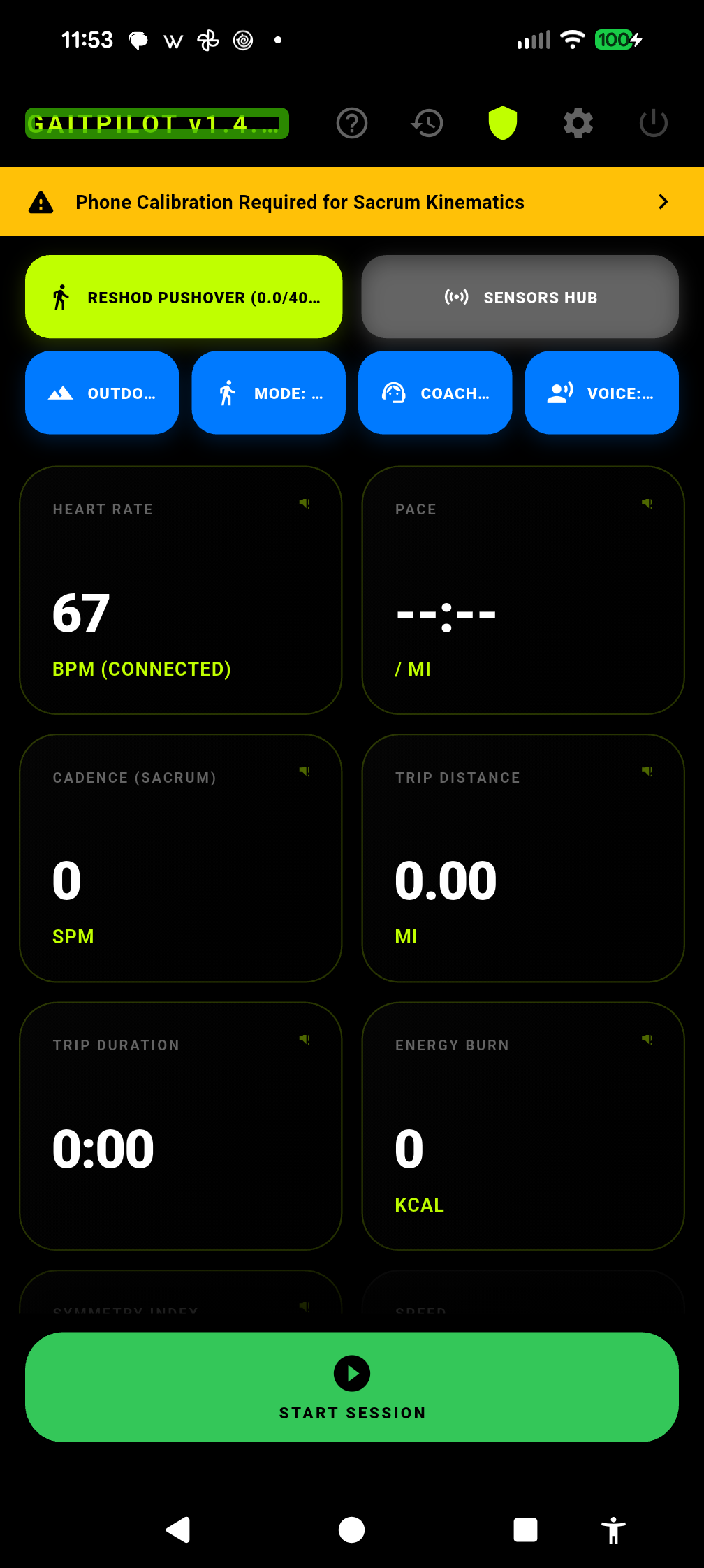
When you open GaitPilot, you are presented with the main telemetry dashboard organized from top to bottom:
1. Top AppBar Navigation (Quick Access Icons)
Located in the upper right header (from left to right):
* 🕒 Past Sessions: Opens your complete history of past workouts, filterable by walking mode, with side-by-side longitudinal comparisons.
* 🛡️ Guardian Safety: Configures emergency contacts, crash/fall/immobility watchdog sensitivity, and automated emergency SMS alerts.
* 📡 Coach Live Share: Configures remote coach live broadcasting, coach contact details, and live GPS map sharing.
* 📺 TV Companion: Pairs smart TVs and displays via 4-digit PIN for real-time 16:9 workout mirroring (visible on Advanced and Pro tiers).
* ⚙️ Settings: Opens the 9-card Settings hub (Subscription Tier, Walker Profile, Route Privacy, Dashboard & Voice Metrics, Audio & Coaching, Connected Companions, Dog Walking, Backup & Restore, and About).
* ? User Guide: Opens this comprehensive online documentation and gear guides.
* ⏻ Exit and Close App: Safely stops background services and closes the application.
2. Hardware & Gear Hub Buttons (Row 1)
Prominently displayed beneath the header:
* 👟 SHOE VAULT: Manage your active footwear rotation, track cumulative shoe mileage, and receive warnings when lateral foam compression degrades your stride. Includes a top-bar [?] help button linking directly to the Shoe Vault section of this guide.
* 📡 SENSOR HUB: Pair, assign, and calibrate your external WT901BLE IMU sensors across 5 anatomical mounting positions (SACRUM, LEFT FOOT, RIGHT FOOT, LEFT WRIST, RIGHT WRIST). Displays streaming rates, battery levels, zero Z-axis baseline calibration, and diagnostic Bluetooth controls. Includes top-bar and sensor-card [?] help buttons linking to sensor placement instructions, plus a dedicated smartwatch help link to the Wear OS Companion Guide.
[!TIP] Contextual Sub-Menu Help Buttons: Every screen and Settings sub-screen across GaitPilot (
Sensor Hub,Shoe Vault,Past Sessions,Settings,Subscription Tier,Walker Profile,Route Privacy,Dashboard & Voice Metrics,Audio & Coaching,Connected Companions,Guardian Safety,Coach Live Share,TV Companion,Dog Walking, andBackup & Restore) features an[?]help button in the top-right corner of its app bar that opens directly to that screen's specific section in this online guide.
3. Quick Training Configuration Bar (Row 2)
Fast, one-tap access to your active training parameters:
* 🏠 ENVIRONMENT (INDOOR / OUTDOOR): Fast binary toggle between outdoor GPS tracking with weather stations and indoor treadmill dead-reckoning physics.
* 🚶 MODE (Walking Profile Picker): Opens the Walking Mode Modal Bottom Sheet (Casual, Dog Walk, Push-Cart, Race Walk, Hiking, Rucking, Vest, Barefoot, Retro, Custom).
* 🎧 COACH (Coaching Persona Picker): Select your preferred audio personality (Sgt. Major, Dr. Move, Coach Speed, Zen Master, Joy Walker).
* 🗣️ VOICE (Spoken Report Interval Picker): Configure how frequently the audio coach announces your progress (Off, Every 1 Min, Every 2 Min, Every 3 Min, Every 5 Min).
4. Live Telemetry Gauges Grid
Displays real-time digital dials for Speed, Cadence, Symmetry, Ground Contact Time, Impact Force ($G$), Pelvic Tilt, and Foot Progression Angle. * Interactive Expanded Cards: Tap any metric card to slide open its multi-tier historical analytics (SESSION, ANNUAL, and ALL-TIME personal records).
5. Bottom Tracking & Session Bar
Located at the base of the screen:
* 🎙️ VOICE Button (Far Left): High-contrast cyan button (#00E5FF) to manually activate offline speech recognition for voice commands or guardian messaging.
* [ MODE: MANUAL | MODE: AUTO-TRACK ] Hero Toggle Pill: Centered directly above the workout action buttons, this high-contrast pill toggles hands-free continuous walking detection. When enabled, 5 seconds of active steps starts your walk, 2 minutes of resting pauses it, and 30 minutes of stationary rest finalizes the session. Double-tapping with TalkBack toggles mode with immediate voice confirmation.
* Mammoth Action Button (Center): Primary high-visibility button toggling between START SESSION (Green #34C759), PAUSE (Amber #FFCC00), and RESUME (Lime #C0FF00).
* Pausing vs. Finishing: Tapping PAUSE suspends inactivity watchdogs, silences metronomes, and updates Guardian live tracking with an amber/blue WALK PAUSED status. Crucially, the Biomechanical Fall Watchdog remains continuously armed during pauses, ensuring you remain protected if you slip while stopped.
* 🛑 FINISH Button (Far Right): Dedicated red button (#FF3B30) revealed only when the session is paused to safely complete or discard the workout.
* Immediate Live Stream Closure: Tapping FINISH (or DISCARD) terminates live cloud broadcasting immediately. Connected TV companions instantly drop live telemetry, display the 3-minute post-walk summary card, and return smoothly to ambient clock standby. Coach and Guardian web dashboards transition to SESSION COMPLETED and lock live drill cue dispatch. Zero residual breadcrumbs or ghost metrics carry over to subsequent walks.
* Extended Post-Walk Review Freedom: Because live broadcasting terminates the moment FINISH or DISCARD is tapped, you can safely leave the post-walk scorecard (SessionSummaryScreen) open on your phone for hours to review your analytics at your own convenience. Remote viewers on smart TVs or web dashboards will never be left watching stagnant data or waiting for you to dismiss the summary screen.
2.2 Hands-Free Voice Commands & Hardware Controls
GaitPilot allows 100% eyes-free operation using physical phone buttons, wired/Bluetooth earbud buttons, and offline voice recognition powered by an embedded Sherpa-ONNX Zipformer neural network model:
1. Tri-Modal Voice Recognition Triggers
- Headset Action Button Hook: Tap or double-tap the play/pause or call button on your wired or Bluetooth headset (
KEYCODE_HEADSETHOOK). A single tap toggles pause/resume (after a 600ms debounce window); a double tap immediately triggers voice push-to-talk. - Phone Volume Rocker Double-Press: Double-press either physical volume button on your phone. This works directly through your waistband or pocket fabric even without wearing earbuds.
- On-Screen Cyan VOICE Button: Tap the cyan
[ 🎙️ VOICE ]button on the bottom control bar of the tracking screen. - Zero-Clipping Stream Warm-Up: The audio pipeline pre-warms the microphone stream before sounding the listening tone, guaranteeing fast spoken commands are never clipped at the first syllable.
- Expanded 30-Second Coach Reply Window: Voice windows for answering coach prompts or dictating guardian messages remain open for 30 seconds before auto-closing.
2. Complete Suite of Spoken Voice Commands
You do not need to speak rigid robotic commands. GaitPilot uses natural phrase matching: * Session Control: - "start", "begin", "resume" → Starts or resumes live tracking. - "pause", "stop" → Pauses tracking and silences pacing tones. - "finish", "end", "done", "exit", "quit" → Concludes session, computes final kinematics, and saves report. * Sensor Calibration: - "calibrate", "calibration" → Initiates a 5-second sacrum baseline alignment countdown. (Stand tall in upright posture). - "switch to pocket mode" / "switch to sacrum mode" → Transitions phone placement mid-stride hands-free. * Single Metric Queries: - "speed" / "pace" → Announces current speed or mile pace. - "distance" / "miles" → Announces total session distance. - "cadence" / "steps" → Announces step rate (SPM) and total steps. - "heart rate" → Announces current heart rate (BPM). - "elevation" → Announces accumulated elevation gain. - "tilt" / "oscillation" / "symmetry" → Announces pelvic posture and balance. - "upper body cadence" / "lower body cadence" → Announces limb-specific turnover. * Full Workout Status: - "status", "report", "all", "everything" → Spoken comprehensive summary of duration, distance, pace, and symmetry. * Spatial Hazard Management: - "hazard [description]" or "mark [description]" → Marks a geotagged hazard at your current location (e.g., "hazard icy patch"). - "delete hazard" or "undo hazard" → Deletes the most recently logged hazard. * Two-Way Coach & Guardian Dictation: - "guardian [message]" or "tell guardian [message]" → Transcribes and sends a live message to your guardian's web dashboard and smart TV. - "coach [message]" or "tell coach [message]" → Sends a live message to the coach command center. - Inactive Session Guard: If you attempt to message when no session is active or paused, the audio engine speaks: "Cannot send message. No walk session is active."
2.3 Walking Profiles & Specialized Modes
GaitPilot adapts its real-time analytics algorithms based on your active walking profile:
- Casual (
casual): Standard recreational walking. Focuses on basic symmetry, step counts, and a relaxed, natural gait. - Power Walking (
power): Fast-paced fitness walking. Focuses on stride turnover, driving the arms, and quick cadence. - Olympic Race Walking (
race): Competitive race walking. Actively monitors flight phase (lifting) and straight knee rules. - Rucking (
rucking): Walking with a weighted backpack. Evaluates trunk slump/lean angles and vertical bounce to protect the spine. - Weighted Vest (
weightedVest): Walking with body weights. Focuses on impact shock and upright posture. - Nordic Walking (
nordic): Walking with trekking poles. Evaluates upper-body arm drive symmetry and pole-sync timing. - Hiking (
hiking) & Trail Walking (trail): Walking on uneven terrain. Relaxes symmetry thresholds and suppresses steppage or camber-induced roll violations to prevent false alarms on rugged trails. - Rehab & Recovery (
clinical): Movement retraining after strain or injury. Prioritizes limp detection, weight-bearing asymmetries, and ankle roll angles. - Barefoot (
barefoot): Natural barefoot gait analysis. Lowers step impact thresholds (0.18G sacrum / 0.35G feet) down to $\le 1.0\text{ mph}$, emphasizes midfoot strikes, and isolates shoe wear tracking. - Retro Walking (
retro): Backward walking. Tracks reverse propulsion and hamstring/glute activation, with automatic $180^\circ$ coordinate normalization ensuring Foot Progression Angle (toe-in / toe-out) displays on the standard anatomical scale ($0^\circ - 15^\circ$). All forward-specific gait pathologies (steppage, spastic hemiplegic, propulsive, pronation, supination, arm hypokinesia, and centerline crossing) as well as forward/downhill braking shear, forward lifting, and bent-knee rules are fully suppressed. Coaching cues adapt directionally (e.g., "push gently off your toes as you step backward"), and forward push-off/flat-foot violations are silenced to eliminate false alarms during reverse locomotion. - Custom (
custom): User-defined activity recorder with customizable observation profiles.
Specialized Canine & Leash Walking Profile (Dog Walking Mode)
Designed specifically for walking dogs on a leash: * Automatic Dynamic Restraint Detection: Dynamically observes bilateral arm swing in real time. Whichever arm is holding the leash (<15° swing while active cadence is present) is automatically identified and suppressed. Swapping hands mid-walk shifts suppression instantly without touching settings. * Form Deviation Alert Suppression: Silences false alerts for arm stillness, arm centerline deviation, and pendulum angle on the leash arm. * Spinal Balance & Strain Prevention: Holding a leash on one side creates continuous lumbar torque. After 5 minutes of continuous one-sided walking, the coach prompts: "Consider switching the leash to your other hand to balance spinal load." Swapping hands logs a successful spinal balance event. * Post-Walk Spinal Balance Index: Completed session summaries calculate a Spinal Balance Index and recommend restorative standing spinal rotations and hip openers to release quadratus lumborum tension. * Pocket Leash Tug Protection: Leash jerks or stops can cause phone slapping in loose pockets. The Fall Watchdog verifies post-impact upright orientation and standing micro-sway, suppressing false alarms.
Specialized Push-Cart & Stroller Profile (Push-Cart Mode)
Designed for grocery carts, baby strollers, or wheeled walkers:
* Hands on Handle & Arm Drive Suppression: Silences arm drive cues ("Drive right elbow back"), focusing coaching strictly on stride turnover and posture.
* Upper-Body Form Breakdown Alert Suppression: Silences false alerts for arm stillness, arm centerline deviation, and pendulum asymmetry caused by resting hands on a handlebar.
* Dashboard Banner & Screen Reader Confirmation: Displays "PUSH-CART MODE: Arm cues & form alerts suppressed." Your screen reader (such as Google TalkBack) reads: "Stroller and Push-Cart mode active. Arm swing cues and upper-body alerts suppressed."
* Cadence-Gated Form Evaluation ($\ge 50\text{ SPM}$): In grocery stores or retail aisles, walkers frequently pause, shuffle, or stretch. Form evaluation (Bent Knee, Lifting, Steppage, Spastic, Limp) is strictly gated behind an active cadence of $\ge 50\text{ SPM}$.
Custom Activity Mode (Flight Recorder)
Built for sports coaches, researchers, and athletes who want pure motion data without coaching observer bias: * Silent Observation Architecture: Silences all automated coaching advice, interval announcements, metronome pulses, posture drones, and hydration reminders. Eliminates the Hawthorne Effect (athletes unconsciously changing posture when cued). * Safety Retained: Critical emergency voice actions (headset SOS, inquiring about current speed) remain fully armed. * Full 100 Hz Deterministic Logging: Captures every foot strike, roll angle, impact deceleration ($G$), ground contact time, pelvic oscillation, heart rate, and GPS course coordinate at 100 Hz precision. * Activity Tagging Dialog: Prompts for a custom tag (Daily Life, Trail Run, Sprint Drills, Yard Work, Golf Swing). Displays a dedicated CUSTOM FLIGHT RECORDER banner in session reports and export files.
2.4 Audio Coaching Personas & Rate-Limiting
Choose the voice assistant that best fits your training style in settings: * Sgt. Major (Tactical): Strict, authoritative cadence caller. Best for rucking and heavy training. * Dr. Move (Form & Recovery): Gentle, informative biomechanical coaching focused on injury prevention, joint safety, and smooth recovery. * Coach Speed (Athletic): High energy and motivating. Focuses on pace, stride turnover, and cadence optimization. * Zen Master (Mindful): Calming, low-frequency guidance focusing on deep breathing and relaxed posture with a strict 4-minute quiet floor between non-critical prompts. * Joy Walker (Habit Cheerleader): Warm, upbeat, and celebratory voice designed for low-stress habit building. Enforces a 60-second breathing room floor, suppresses repetitive arm-drive nags, and frames adjustments with positive encouragement (e.g., "feel that light, springy step").
Intelligent Audio Rate-Limiting & Priority Hierarchy
To ensure you are never overwhelmed with acoustic clutter:
1. Priority Hierarchy: Tier 0 (Emergency SOS & Live Coach/Guardian Messages) → Tier 1 (Critical Form Breakdown & Severe Limp) → Tier 2 (Lower Extremity Form Corrections) → Tier 3 (Upper Extremity Kinematics).
2. Global Audio Breathing Room: The coach will never talk over itself or deliver conflicting advice at the same moment. Dr. Move enforces an expanded 20-second breathing room floor (Joy Walker enforces 60 seconds; Zen Master enforces 4 minutes) to maintain calm, non-fatiguing pacing during complex outdoor walks.
3. 5-Second Post-Resume & Start-Up Grace Buffer: When accelerating from a stop, crossing a street, or resuming after a dog sniff pause ($\text{SPM} < 35$ or $\text{speed} < 0.5\text{ mph}$), transient form warnings (pushOff, flatFoot, and highBrakingShear) are silenced during the initial 5 seconds until steady-state locomotion is re-established.
4. Cooldown Windows: Critical form alerts enforce a 2-minute lockout before repeating; mild warnings enforce a 5-minute cooldown; real-time biofeedback form corrections enforce a 15-second debounce; cadence drop reminders enforce a 45-second cooldown to prevent repetitive nags when hovering near target pace.
5. Arm Swing 45-Second Window: Upper-body arm drive is evaluated over a 45-second smoothing window to ensure guidance feels timely without being hyperactive.
6. Session Isolation & Sensor Filtering: Audio prompt history is automatically cleared at the start of each session so previous audio transcripts do not bleed into new reports, and foot roll angles are clamped to $\pm 45^\circ$ to filter hardware twist spikes.
Universal Limb Attribution Mandate
To ensure complete clarity for eyes-free and screen-reader locomotion, GaitPilot enforces the Universal Limb Attribution Mandate across all coaching personas. The coach never issues generic, ambiguous warnings like "Severe inward foot roll detected!" Instead, every unilateral form alert explicitly names the offending limb (e.g., "Severe inward roll on your left foot! Maintain a neutral arch!" or "Excessive outward roll on your right foot!"). This enables walkers to make instantaneous, targeted corrections without breaking stride or checking the screen. This mandate governs all current and future unilateral coaching cues across foot roll, foot slap, impact landing, braking shear, and upper-body arm swing.
2.5 Metronome, Posture Drone & Real-Time Sonification
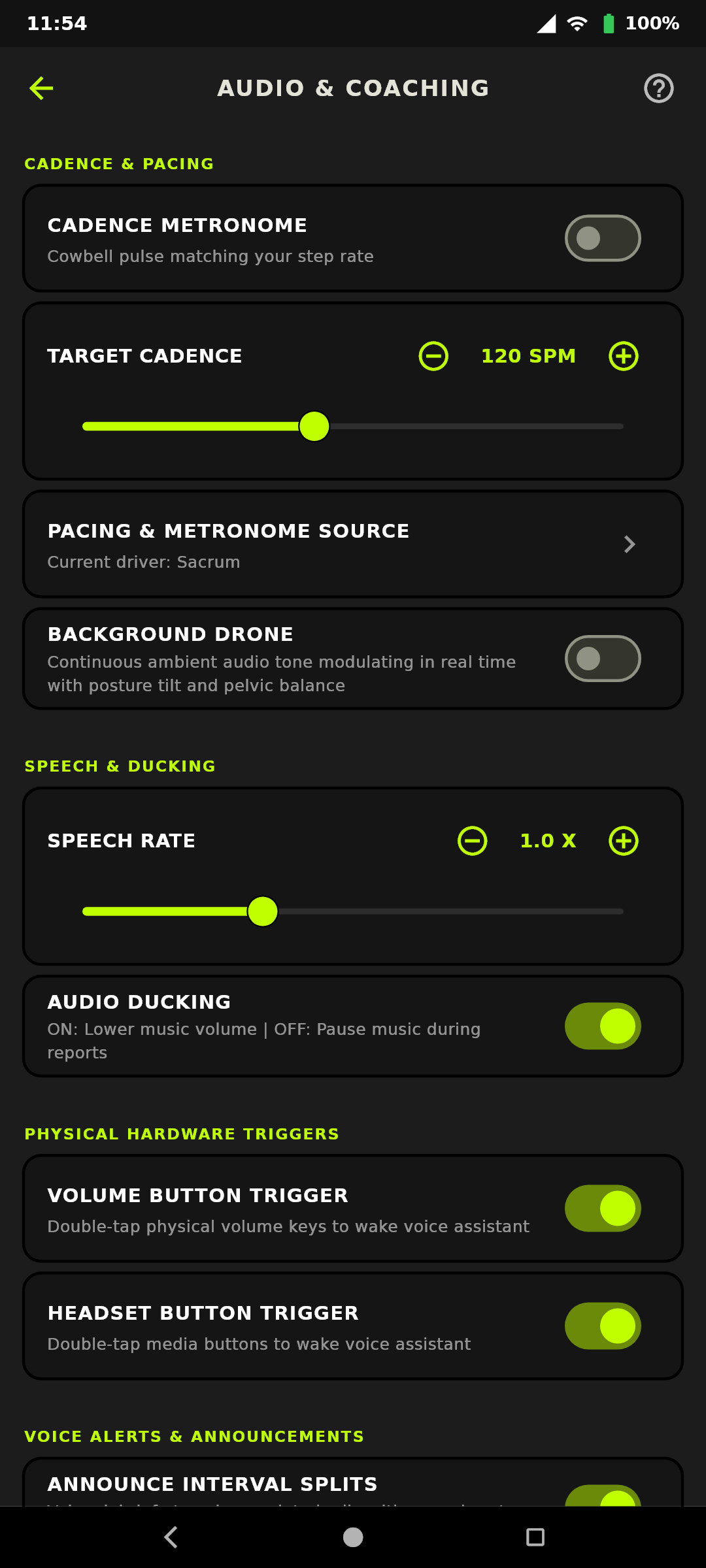
1. Cadence Metronome (Pacing Pulses)
Enable in Settings -> AUDIO & COACHING: * Generates a crisp, rhythmic acoustic pulse (woodblock / cowbell click) locked to your configured Target Cadence (e.g., 110 SPM for brisk walking, 130+ SPM for power walking). * Silences instantly whenever you pause your session or stop at a street crossing.
2. Background Drone (3D Posture Sonification)
Enable in Settings -> AUDIO & COACHING for continuous eyes-free posture feedback: * Pitch (Sagittal Lean / Trunk Slump): - Higher Pitch: Torso leaning forward or slumping. → Correction: Lift your chest and stand tall. - Harmonic Root Pitch: Spine perfectly aligned with upright baseline. - Lower Pitch: Over-arching or leaning backward. → Correction: Center your torso over your hips. * Stereo Panning (Coronal Pelvic Drop / Obliquity): - Panned Left Earbud: Left hip is dropping. → Correction: Level pelvis by engaging right glute. - Panned Right Earbud: Right hip is dropping. → Correction: Level pelvis by engaging left glute. - Centered Tone: Pelvis is level and symmetrical.
Quick Comparison: Cadence Metronome vs. Background Drone
| Feature | Cadence Metronome | Background Drone Sonification |
|---|---|---|
| Audio Acoustic Style | Discrete, rhythmic percussion click (cowbell/woodblock) | Continuous harmonic synthesizer tone |
| Biomechanical Focus | Step turnover frequency (When to step) | 3D spine and pelvic alignment (How to hold posture) |
| Audio Behavior on Turns / Tilts | Constant beat locked to configured Target SPM | Modulates pitch (sagittal lean) and stereo pan (pelvic drop) |
| Ducking & Auto-Muting | Mutes instantly when stopped or when coach speaks | Ducks smoothly under spoken coach announcements and sirens |
| Best Used For | Pacing consistency, cadence drills, race walking turnover | Preventing lower back slump, lateral hip drop, and fatigue |
3. Elevation-Compensated Incline & Decline Posture Coaching
GaitPilot integrates barometric pressure and GPS grade sensors to dynamically adapt posture coaching and elevation tracking:
* Hardware Barometer Prioritization & Schmidt-Trigger Hysteresis: Elevation gain calculation prioritizes the phone's internal hardware barometer with an EMA low-pass filter ($\alpha = 0.20$) and a Schmidt-trigger peak/trough hysteresis filter ($1.0\text{ m}$ / $3.28\text{ ft}$ threshold), rejecting ambient thermal drift and sensor flutter so flat walks record $0\text{ ft}$ while gently sloped roads accumulate accurately. For devices lacking a physical barometer, an automatic GPS altitude fallback engages with a $2.5\text{ m}$ ($8.20\text{ ft}$) hysteresis threshold to prevent phantom climbing while accurately accumulating true ascents.
* 15-Meter Slope Smoothing: Real-time slope calculation evaluates grade across a smoothed 15-meter horizontal rolling window (_slopeWindowMeters = 15.0) before triggering uphill or downhill state, preventing instantaneous GPS altitude jitter from falsely triggering downhill coaching on flat surfaces.
* Uphill Forward Lean Allowance ($8^\circ\text{ to }15^\circ$): Ascending hills requires forward lean. GaitPilot automatically applies a grade offset, permitting up to $15^\circ$ of forward COM lean without false alarms.
* Downhill Posture & Braking Reflex Guardian: Descending steep slopes tempts walkers to lean back and lock knees, generating high impact. The coach proactively cues: "Downhill detected: keep knees soft, shorten your stride, and stay centered over your hips." Downhill braking shear audio alerts are spaced with a 60-second cooldown to eliminate repetitive cue fatigue.
4. Foot Slap Form Sonification
Monitors the rapid deceleration transition from Initial Contact (IC) to Foot Flat (FF). Requires a minimum 200 ms stance time and midstance foot-flat stabilization before evaluating rapid plantarflexion snap (>180°/s), filtering out mid-swing scuffs. Delivers an immediate haptic pulse and spoken coaching: "Foot slap detected. Gently control the roll of your foot as you land."
5. Environmental & Weather-Adaptive Coaching
- Barometric Pressure & Altitude Adaptation: Barometer adjusts caloric energy expenditure to reflect the higher cardiac and lung workload required at higher altitudes.
- Thermal Stress & Heat Index: In high heat and humidity (Heat Index over 80°F), accounts for cardiovascular drift and adjusts caloric burn.
- Dynamic Hydration Alerts: Automatically shortens hydration reminders from 20 minutes down to every 12 minutes under severe heat to protect against dehydration.
Part 3: Post-Workout Reports & Biomechanical Metrics Guide
3.1 The 4-Tab Session Report
When you finish your workout, GaitPilot immediately compiles an exhaustive, accessible 4-tab Session Report:
- SUMMARY (Tab 1): Executive overview: Total miles, average pace, max speed, total steps with verified breakdown (
Total Steps: X (Foot Sensors: Y | Phone Pedometer: Z)), active duration, calories burned, heart rate, and the composite Gait Form & Symmetry Score. Performance statistics also showcase independent cadences across all active channels. - METRICS (Tab 2): Deep-dive biomechanics: Pelvic tilt angles, sacrum oscillation, coronal obliquity, arm-swing ranges, stance-phase planted shoe angles, multi-node limb cadences, and the Interval Mile Splits Deck.
- INSIGHTS (Tab 3): Movement quality scorecard, form violation audit, and coaching log:
- Form Deviations & Movement Quality Auditing: Timestamped logs of all detected deviations with explicit delivery status badges (
[Spoken]or[Held Back: <Reason>]). - Coaching Log: Timestamped transcripts of spoken cues, hydration reminders, and two-way coach/guardian communications.
- Clean Form Positive Reinforcement: When zero form breaks occur, displays: "Clean Gait Form — Zero violations detected!".
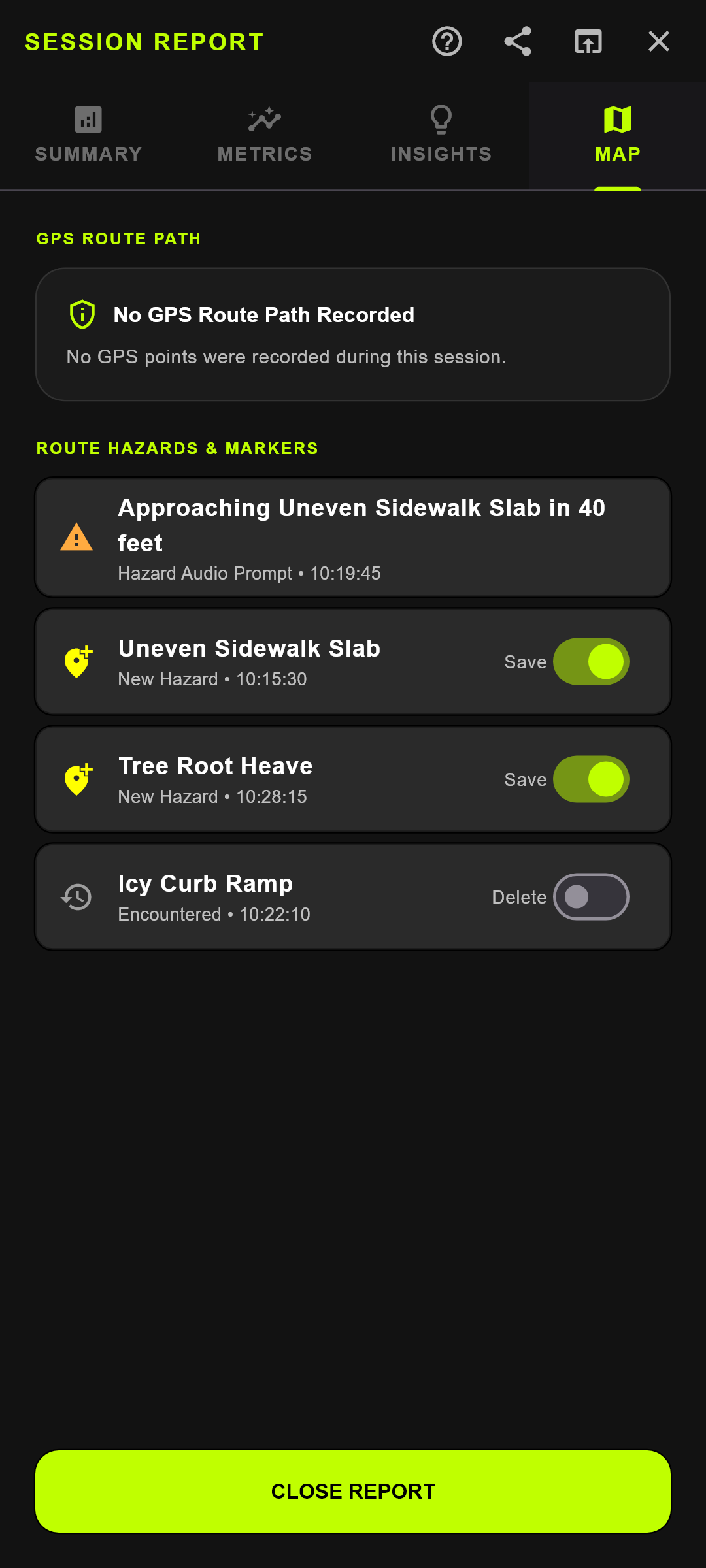
- MAP & HAZARDS (Tab 4 - Outdoor Only):
- Interactive high-contrast dark Google Map displaying your route polyline, start/stop pins, and encountered hazards.
- Route Hazards & Markers List: Manage geotagged obstacles with interactive Save/Delete switches.
- Indoor Adaptation: When Indoor Mode is active (or no GPS was acquired), the Map tab is automatically omitted, leaving a clean, focused 3-tab layout.
Session Summary Actions
- OPEN ANALYSIS DASHBOARD: Launches the web Analysis Dashboard in your browser scoped directly to your anonymous identifier (
gaitpilot.com/dashboard?walker_id=<UUID>&session_id=<ID>). Allows instant review of 3D bone avatar animation, interactive kinematic graphs, and multi-session comparisons without requiring account passwords. - SYNC TO DASHBOARD & Cellular Prompt: Prompts to upload session data to the Cloud Backend. If connected to mobile data, an accessible confirmation dialog asks: "Upload over Cellular Data?" Choosing Yes uploads telemetry immediately; choosing No defers sync until Wi-Fi is connected.
- SHARE: Generates a clean text summary or full
.txtreport exportable via system intents. - SAVE LOCALLY: Closes the session and safely persists records to device SQLite storage.
3.2 Interval Mile Splits & Biomechanical Breakdown
GaitPilot synchronizes multi-dimensional kinematic physics, environmental context, and movement observations directly into every mile interval:
- Automated On-Device Mile Sealing: The exact moment distance crosses each 1.0-mile boundary (1.0 mi, 2.0 mi, 3.0 mi...), an interval split is sealed. Fractional distances at session finish are automatically sealed as the final split. Zero distance is ever discarded.
- Comprehensive Split Metrics:
- Pace & Speed: Duration, average pace (
MM:SS/mi), average speed, peak speed (mph). - Cadence & Exertion: Average/peak cadence (
SPM), average/peak heart rate (BPM), active caloric burn (kcal). - Environmental: Net elevation gain (
ft), temperature (°F), humidity (%), barometric pressure (hPa). - 100 Hz Bilateral Biomechanics: Bilateral impact shock ($G$), Ground Contact Time (
ms), Symmetry Index (%), and step posture breakdown (Neutral,Pronation,Supination). - Hands-Free In-Ear Spoken Debriefs: Crossing each mile boundary triggers an immediate spoken debrief through your headphones:
"Mile 1 complete in 18 minutes 20 seconds. Pace 18 minutes 20 seconds per mile. Heart rate 124. Symmetry 96 percent. Peak right impact 2.8 G." (Can be toggled in Settings -> Audio Alerts -> Announce Interval Splits).
- Fatigue Curves & Biomechanical Degradation: Comparing Mile 1 to subsequent miles reveals fatigue onset long before cardiovascular exhaustion. If Right Impact Shock rises from 2.1 G to 5.8 G while Left Ground Contact Time elongates by 40 ms, the athlete is developing asymmetrical joint loading.
- Athletic "Glide Mode" Validation: In endurance walking, entering "glide mode" is objectively verified when cadence stabilizes at personal equilibrium, vertical oscillation drops, and symmetry converges toward 98–100%.
3.3 Biomechanical Metrics Dictionary & Practical Interpretation
1. Dynamic Foot Cluster (Shoe Pod IMUs)
- Planted Angles (Shoe Roll at Midstance): Measured precisely during the stable Zero-Velocity Update (ZUPT) midstance window relative to Earth horizontal:
- Neutral ($4.0^\circ \text{ to } 10.0^\circ$): Healthy anatomical shock absorption.
- Mild Pronation ($10.1^\circ \text{ to } 15.0^\circ$): Slight inward ankle roll.
- Severe Over-Pronation ($>15.0^\circ$): Excessive inward roll; indicates flat feet or collapsing shoe foam.
- Mild Supination ($-2.0^\circ \text{ to } 3.9^\circ$): Slight outward ankle roll.
- Severe Supination ($<-2.0^\circ$): Rigid outward loading; high arches.
- Foot Progression Angle (FPA / Toe-In vs. Toe-Out): Transverse foot orientation during midstance evaluated dynamically relative to the forward swing stride trajectory (eliminating magnetic interference and compass drift across both indoor 6-axis and outdoor 9-axis modes):
- In-Toeing ($<0^\circ$): Pigeon-toed stance increasing lateral knee torque.
- Normal Progression ($0^\circ \text{ to } 15^\circ$, typically $5^\circ - 15^\circ$): Biomechanically ideal flare for hip clearance and forward propulsion.
- Excessive Out-Toeing ($>20^\circ$): Duck-footed stance reducing push-off efficiency by up to 15% and straining the medial knee.
- Foot Strike Pattern Classification: Shoe pitch angle at initial contact:
- Rearfoot Strike (Heel Strike, $>10^\circ$): Standard for fitness and race walkers.
- Midfoot Strike ($-5^\circ \text{ to } 10^\circ$): Balanced contact optimal for natural load carriage.
- Forefoot Strike ($<-5^\circ$): Landing on the ball of the foot.
- Push-Off Peak Angular Velocity ($\omega_y$): Peak rotational velocity ($^\circ/\text{s}$) during terminal stance:
- Normal Push-Off ($\ge 200^\circ/\text{s}$): Healthy calf (gastrocnemius/soleus) power generation.
- Weak / Low-Power Push-Off ($< 150^\circ/\text{s}$): Ineffective propulsion; indicates fatigue or calf weakness.
- Ground Contact Time (GCT): Duration (ms) foot remains on ground during stance phase.
- Impact Deceleration Force ($G$): Peak vertical impact deceleration shock experienced upon initial contact.
- Stance Sub-Phases (% of Stance Time):
- Loading Response %: Initial contact through foot flat shock absorption.
- Mid-Stance Flat Foot %: Full weight-bearing foot flat balance phase.
- Terminal Push-Off %: Heel-off through toe-off propulsive drive.
- Forefoot Braking Shear ($G_x$): Peak anterior-posterior deceleration force ($G$) measured during the initial 80 ms of stance impact. Quantifies forward foot sliding inside the shoe. Values $> 1.4\text{ G}$ on flat ground or $> 1.15\text{ G}$ on downhill descents identify repetitive toe microtrauma risk ("runner's toe" / subungual hematoma). Bilateral asymmetry ($> 15\%$) detects unbalanced braking or unilateral overstriding.
2. Pelvic & Center-of-Mass Kinematics (Sacrum Sensor / In-Belt Phone)
- Pelvic Tilt (Sagittal Slump): Forward/backward lean angle relative to calibrated upright posture.
- Pelvic Obliquity (Coronal Lateral Drop): Lateral side-to-side hip drop; evaluates gluteus medius strength.
- Pelvic Rotation (Transverse Axial Yaw): Forward/backward rotational twisting of the pelvis.
- Vertical Oscillation: Center-of-mass vertical bounce amplitude (cm).
- Bilateral Symmetry Index: Mathematical percentage comparing left vs. right stance durations. 100% is perfect symmetry; $<90\%$ indicates an asymmetrical limp or fatigue.
3. Arm Swing Mechanics (Wrists / Smartwatch)
- Dynamic Peak-to-Peak Excursion ($|\text{pitch}{\max} - \text{pitch}|$): Evaluates active arm drive arc (normal: $40^\circ\text{ to }115^\circ$).
- Arm Centerline Crossing: Evaluates whether wrists cross the torso midline, causing wasted rotational sway.
- Arm Freezing (Hypokinesia): Detects lack of arm movement ($<15^\circ$ excursion while walking).
3.4 Biomechanical Form Violations & Gait Irregularities Reference
When active sensors detect irregular gait patterns, timestamped violations are recorded in the INSIGHTS tab and announced by your coach:
| Violation | Meaning / Trigger | What It Indicates | Recommended Action |
|---|---|---|---|
| Severe Over-Pronation | Ankle rolls inward >15.0° during stance on left or right foot. Spoken cue names offending limb: "Severe inward roll on your [left/right] foot!" | Excessive inward ankle loading; flat feet or worn shoes. | Use supportive insoles; inspect footwear cushioning. |
| Mild Over-Pronation | Ankle rolls inward 10.1° to 15.0° on left or right foot. Spoken cue names offending limb: "Inward roll on your [left/right] foot." | Slight inward loading; acceptable but monitor. | Monitor footwear for asymmetrical wear. |
| Neutral Alignment | Ankle roll between 4.0° and 10.0°. | Healthy biomechanical alignment. | Keep it up! |
| Mild Supination | Ankle rolls outward -2.0° to 3.9° on left or right foot. Spoken cue names offending limb: "Excessive outward roll on your [left/right] foot!" | Slight outward loading, higher arches. | Monitor footwear for lateral wear. |
| Lifting (Race Walk) | Both feet lose ground contact >40ms (Race Mode only). | Loss of continuous ground contact (flight phase). | Shorten stride; keep rear toe on ground longer. |
| Bent Knee (Race Walk) | Advancing leg bent at heel strike (Race Mode only). | Inefficient race walking form; loss of knee lock. | Focus on straight-knee contact until body is vertical. |
| Steppage | Excessive vertical leg lift during swing phase. | Foot drop; compensation for dragging toes. | Focus on active ankle dorsiflexion (lifting toes up). |
| Spastic/Scissors | Sudden deceleration/crossover leg swing. | Crossed-over stride or high-impact braking. | Focus on wider, parallel footsteps; land softly on heel. |
| Propulsive | Forward trunk lean exceeds 20°. | Slouched posture; loss of center-of-mass balance. | Pull shoulders back and stand upright. |
| Trendelenburg | Pelvis/sacrum drops laterally >15°. | Weak hip stabilizers (gluteus medius). | Level hips; incorporate glute strengthening exercises. |
| Antalgic Limp (Asymmetry) | Bilateral stance bias deviation exceeds 2.5% Warning or 5.0% Critical. | Unequal weight-bearing or pain avoidance favoring one limb. | Distribute weight evenly; inspect insole cushioning or rest. |
Profile Scoping & Universal Kinematic Observation Note: Athletic penalties (Lifting and Bent Knee) trigger live HUD violation badges and spoken coach audio warnings strictly in Olympic Race Walking mode. In all other profiles (including Casual, Custom Activity, and Nordic), lifting and bent-knee occurrences are logged continuously as silent observations tagged
'Silent observation (mode constrained)'without generating audio alerts or HUD badges. This ensures full data capture for longitudinal analysis and before-and-after baseline comparisons without interrupting non-race walkers. Additionally, the coach enforces a 25-second warm-up grace period on session start so initial stepping transitions do not trigger false cues. | Arm Centerline | Wrist crosses torso's vertical midline. | Rotational inefficiency; side-to-side arm sway. | Keep arm drive parallel to body (pendulum swing). | | Arm Pendulum | Arm swing pitch swing exceeds 120°. | Excessively large or uncontrolled arm swings. | Keep elbows bent at 90° and swings compact. | | Foot Slap | $\text{IC} \rightarrow \text{FF} \le 35\text{ ms}$ with $\ge 250^\circ/\text{s}$ pitch acceleration. Spoken cue names offending limb. | Pretibial / anterior tibialis eccentric weakness. | Focus on gentle heel-to-toe rolling; consult a specialist. | | Weak Push-Off | Peak propulsive velocity $< 150^\circ/\text{s}$ at toe-off. | Inadequate plantarflexion power; calf/Achilles fatigue. | Drive actively off first metatarsal head (big toe). | | Low Push-Off Stance | Push-off phase $< 18\%$ of total stance time. | Premature toe-off or weak propulsive roll-off; shuffling. | Drive actively off the big toe and extend push-off phase. | | Prolonged Flat-Foot | Mid-stance flat foot phase $> 65\%$ of total stance time. | Delayed heel rise; prolonged ground contact drag. | Work on dynamic roll-through and timely heel lift. | | High Braking Shear | Initial stance deceleration $G_x > 1.4\text{ G}$ (or $> 1.15\text{ G}$ downhill). Spoken cue names offending limb. | Excessive anterior braking force; foot sliding forward into toe box ("runner's toe" microtrauma). | Shorten forward reach; land closer underneath body; use heel-lock lacing. | | Downhill Braking Hazard | Downhill slope ($< -4\%$ grade) with braking shear $> 1.15\text{ G}$. Spoken cue names offending limb: "Downhill glide braking hazard on [left/right] foot!" | Gravity-assisted forward foot slide slamming toes into shoe front bumper during descent glides. | Soften knees, quicken cadence, take shorter descent steps, and verify lace lock. |Universal Limb Attribution Note: In accordance with GaitPilot's Universal Limb Attribution Mandate, all unilateral biomechanical cues (pronation/supination roll, ground impact shock, braking shear, foot slap, and arm drive) explicitly name the target limb (
left foot,right foot,left arm,right arm) across all 5 coaching personas so walkers can make immediate corrections without needing to view the screen.
3.5 Past Sessions & Comparative Analytics
Because of GaitPilot's edge-first architecture, your complete history is stored on your device and instantly accessible offline:
Comparing Two Sessions in Past Summaries
To evaluate the before-and-after impact of a new shoe, orthotic insole, or corrective movement drill: 1. Open the drawer or top AppBar and tap Past Sessions. 2. Tap the COMPARE button in the top app bar to activate comparison mode. 3. Check exactly 2 sessions from your history (e.g., your Baseline shoe session vs. your New Insole session). 4. Tap the prominent button COMPARE 2 SESSIONS at the bottom of the screen. 5. An interactive comparison modal displays exact side-by-side delta metrics across: - Planted Angles (Left & Right): Midstance roll angle correction in degrees. - Impact Force (Left & Right): Peak deceleration force reduction in $G$. - Ground Contact Time (GCT): Left and right contact durations in milliseconds. - Asymmetry Bias: Bilateral weight-bearing distribution shift toward 50.0%. - Core & Pelvic Dynamics: Sacral yaw surge and stance vaulting ratio. 6. Use the COPY or SHARE buttons to export the full comparative report for your coach or movement specialist.
Part 4: Expanding Your Gear & Hardware Ecosystem
4.1 Shoe Vault, NFC Tap-to-Equip & Midsole Wear Intelligence
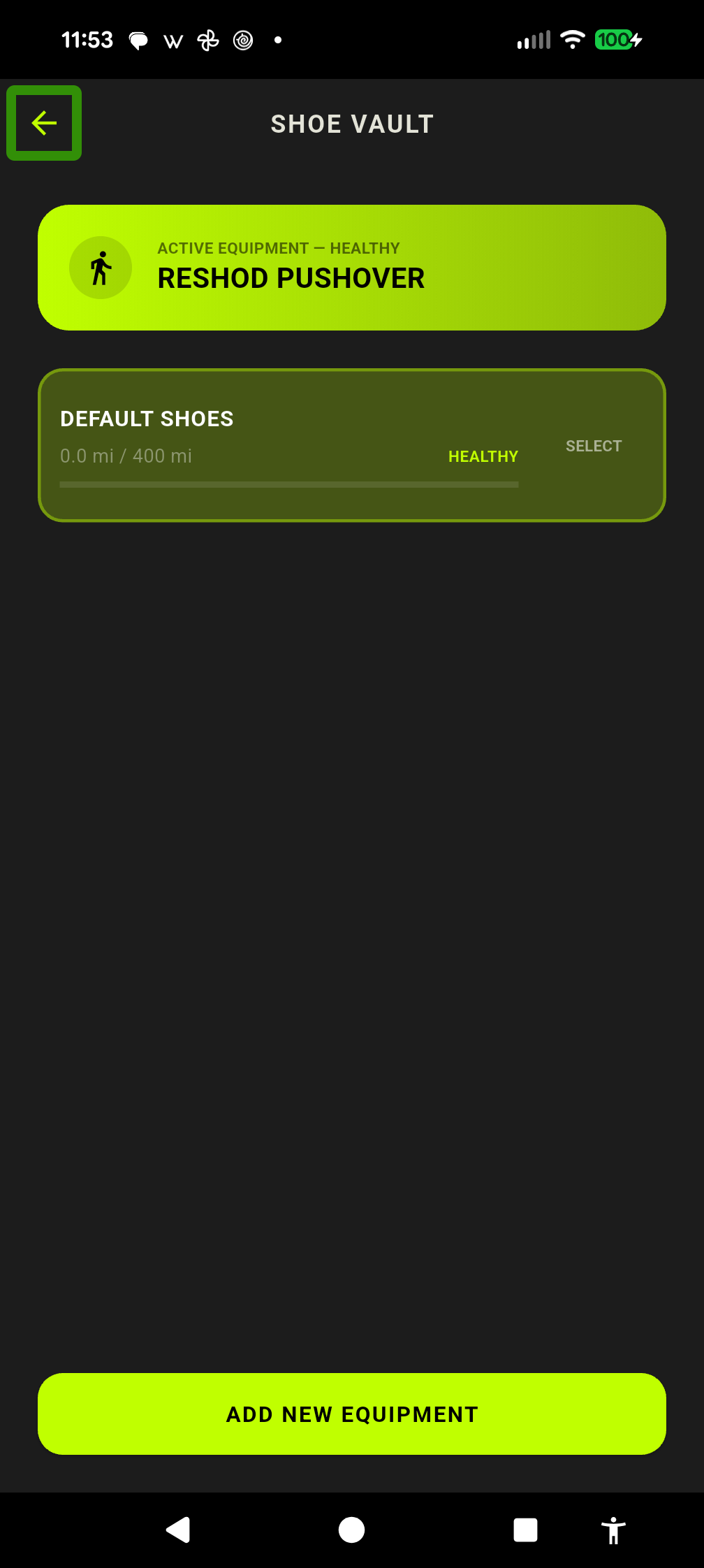
Protect your joints and prevent overuse fatigue by monitoring footwear wear and midsole foam breakdown:
- Registering Footwear: Open the Shoe Vault to add your walking shoes, set brand/model details, and specify a target mileage lifespan (default: 400 miles).
- Automatic Mileage Accumulation: Distance from completed sessions is automatically logged against your active footwear.
- Dynamic Biomechanical Midsole Degradation: Beyond simple mileage, high-frequency motion sensors (100 Hz foot pod IMUs) detect real midsole foam breakdown:
- Recorded Roll Events: Cumulative count of steps where ankle roll exceeded physiological thresholds ($>15.0^\circ$ over-pronation or $<-2.0^\circ$ supination). Normal pronation ($4.0^\circ\text{ to }10.0^\circ$) is strictly exempted.
- Degradation Warning Threshold: Once a shoe logs >5.0 miles, if
totalViolations > (shoe.mileage * 100)(averaging >100 severe violations per mile, or $\approx 5\%$ of strides), the shoe flips from HEALTHY (neon green) to DEGRADATION WARNING (bright red), signaling EVA midsole collapse. - Shoe Profile Editing & Break-In Period Reset (~40 Miles): During the initial 20–50 miles of fresh shoes or dynamic footbeds (such as New Balance 880 v15 with SOLE Performance Medium insoles), footbeds adapt to your feet. Early adaptation strides can accumulate spurious roll events. Once broken in (~40 miles), tap the pencil icon, check Reset Kinematic Violations, and tap SAVE. Accumulated mileage remains intact, while the violation counter resets to 0. Future degradation warnings will accurately reflect true structural wear.
- NFC Tap-to-Equip: Place an inexpensive adhesive NFC sticker (Type 2 / NTAG213 or NTAG215) on your shoe tongue. Before walking, tap the back of your phone to the shoe tongue. GaitPilot instantly identifies the shoe ID, switches the active pair in the Shoe Vault, and announces the shoe name via speech ("Equipped New Balance 880").
Evaluating Corrective Footwear & Orthotics (Diagnostic Workflow)
- Calibration: Calibrate Left and Right Foot WT901 sensors flat on a level table or floor to establish Earth zero.
- Barefoot Baseline Walk: Mount sensors across your bare instep, select Barefoot mode, and walk 50–100 steps. Save as Barefoot Natural Baseline.
- Footwear Evaluation Walk: Attach sensors to your shoe laces, select Casual mode, and walk the same distance with your neutral walking shoes and insoles. Save as Footwear Test.
- Compare Results: Open both sessions in Past Sessions -> Compare:
- Ideal Correction: Neutral steps increase to 70%–100%; planted angles center between 4.0° and 10.0°.
- Under-Correction: Pronation steps remain >30% or planted angles exceed 12°–15° (inadequate arch support).
- Over-Correction: Planted angle < 2.0° with high supination counts (arch support is too aggressive).
4.2 Sensor Hub & Hardware Placements
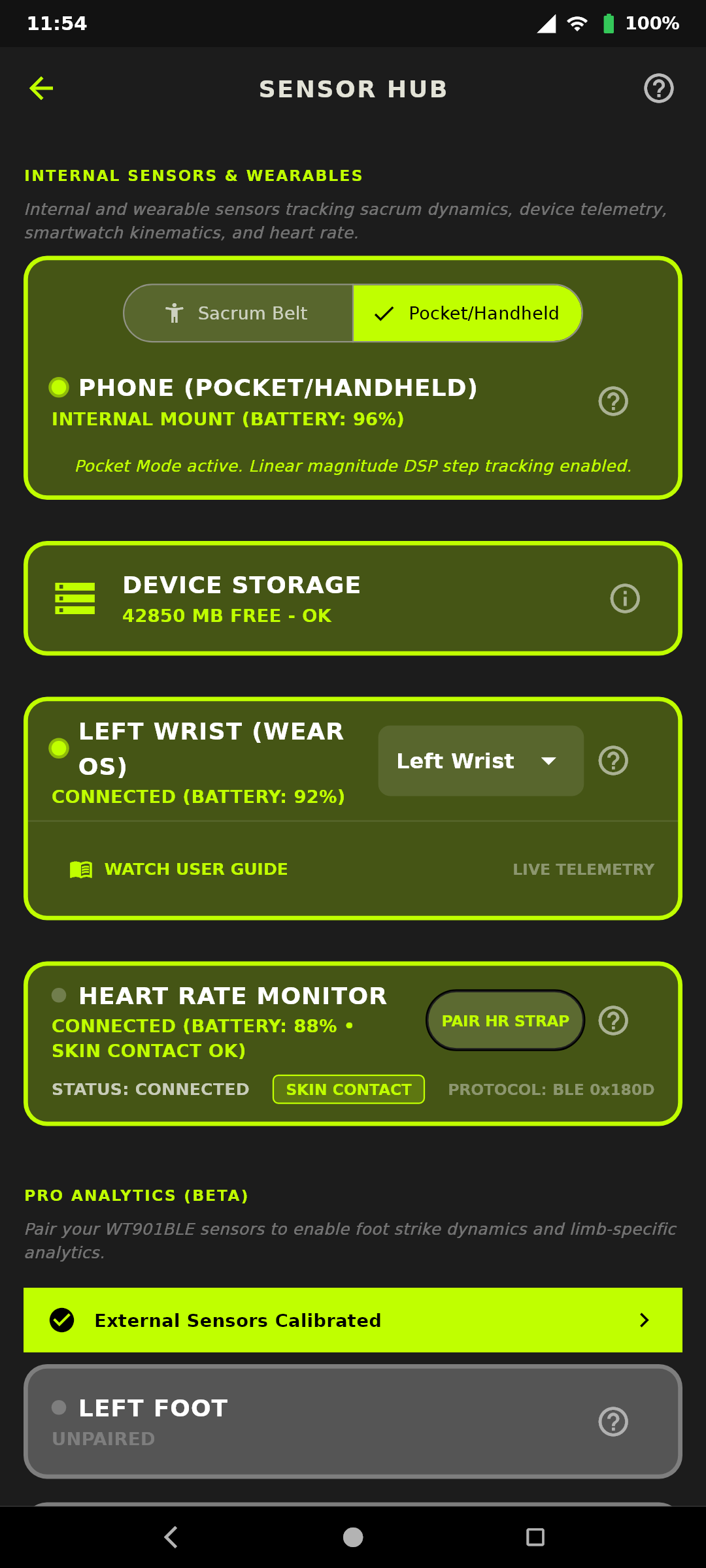
The Sensor Hub serves as the central mission control for all platform telemetry peripherals, host phone sensors, storage health, and wearable links. To provide complete predictability for blind screen-reader users and sighted walkers alike, sensor controls are organized in a strict, standardized vertical card column:
1. Standardized Sensor Card Hierarchy
- Phone Sensor Card: Displays host device 6-axis IMU readiness, phone battery percentage, and live native hardware battery temperature in Celsius (
TEMP: X.X°C). Includes a contextual[?]help button linking directly to phone placement instructions. - Device Storage Card: Live free internal disk space monitoring. Proactively triggers readiness alerts ($\le 200\text{ MB}$ warning, $\le 50\text{ MB}$ critical error) to ensure long workouts are never truncated by storage exhaustion. Includes a contextual
[?]help button linking to storage safeguards. - Smartwatch Card: Manages companion Wear OS smartwatch links, battery percentage, watch placement (
Left Wrist/Right Wrist/Off), and live watch hardware battery temperature (TEMP: X.X°C). Includes a contextual[?]help button opening the Wear OS companion guide. - Heart Rate Monitor Card (Slot 4): Connects to any standard Bluetooth SIG Heart Rate peripheral (
0x180D/0x2A37) and Battery Service (0x180F), including Whoop Strap 4.0, Polar H10, Garmin HRM-Pro, and arm/chest straps. Surfaces real-time BPM, strap battery level, skin contact detection (Contact DetectedvsNo Skin Contact), and rolling RMSSD autonomic tone. Includes a contextual[?]help button linking to the Heart Rate & Wearables guide. - Calibration Banner: Dynamic 1-tap master soft tare banner that illuminates whenever uncalibrated sensors or phone sacrum are detected.
- External WT901 Sensor Cards: Five dedicated hardware slots (
Sacrum,Left Foot,Right Foot,Left Wrist,Right Wrist). Each card reports connection status, centivolt-normalized battery level, hardware register temperature (TEMP: X.X°C), Euler angles, and streaming frequency, equipped with individual contextual[?]help buttons for mounting orientation and calibration. - Discovered Devices: Single centralized scan list at the bottom of the hub, strictly filtering for actively broadcasting BLE devices.
2. Decoupled Shoe Vault vs. Sensor Hub Readiness
- Sensor Hub Readiness: The SENSOR HUB status button and readiness watchdog evaluate purely hardware and operating parameters: available disk storage ($\le 50\text{ MB}$ error / $\le 200\text{ MB}$ warning), phone battery ($<15\%$ error / $<30\%$ warning), smartwatch connection and battery, heart rate monitor skin contact, and WT901 sensor faults.
- Shoe Vault Independence: In strict adherence to the Shoe Vault Independence Rule, footwear selection never alters the Sensor Hub button or readiness indicator. Barefoot profile mismatches (such as selecting a Barefoot walk profile while a standard running shoe is equipped) and midsole degradation warnings are evaluated exclusively within the SHOE VAULT button, color, and action toasts.
3. Hardware Placement & Mounting Orientation
[!CRITICAL] Sensors must be attached in the exact required orientation every time. Software calibration does NOT fix backward or upside-down sensors!
Smartphone Carrying Placements:
- Phone (Pocket Mode - Default): Place the phone vertically or naturally in your front trouser pocket. The screen can face either toward or away from your thigh. No standstill tare or alignment calibration is needed. GaitPilot combines native Android hardware pedometry with dynamic tri-axial accelerometer filtering to track steps, cadence, and distance while ignoring incidental leg jiggles.
- Phone (Handheld Mode): Hold the phone comfortably in either hand while walking, or slip a hand strap around your fingers. Perfect for walkers who prefer holding their device or viewing the screen. GaitPilot's isolation filter separates upper-body arm swing oscillations from ground-contact step impacts so cadence and step counts remain rock-solid.
- Phone (Sacrum in SpiBelt): Placed horizontally in landscape mode across your lower back (L4–S1), screen facing AWAY from body (rear camera facing body), top edge (camera side) pointing to your LEFT hip. Required when using the phone's internal 6-axis IMU to track pelvic biomechanics (sacral tilt, obliquity, and rotation). Requires a quick 5-second standing upright calibration before walking.
External WT901 IMU Sensor Mounting:
- Shoe Mounting (Feet): Top Z-Axis label faces UP (away from gravity), Y-Axis power switch to your LEFT, and X-Axis mounting ears FORWARD toward toes. Secure firmly through shoe laces using the silicone strap or clip.
- Sacrum Mounting (WT901): Bottom of sensor flat against sacrum (L4–S1) in an elastic belt or clip. Top Z-axis label points BACKWARDS (away from body). Y-Axis power switch points to your LEFT; X-Axis ears point UP toward head.
- Wrist Mounting: Worn like a watch. Bottom against skin, top Z-axis pointing away from wrist. Y-Axis switch points down arm toward hands.
WT901 Sensor Cards: Setup & Daily Operation:
Each dedicated WT901 card in the Sensor Hub provides complete status and diagnostic controls:
* Power & Connection: Slide the physical switch on the sensor to turn on. The card displays live connection state (Connected vs Disconnected) with auto-reconnect.
* Centivolt Battery Gauge: Displays normalized battery voltage percentage so you always know when to recharge.
* Internal Register Temperature (TEMP: X.X°C): Reports hardware operating temperature directly from the WT901 sensor registers.
* Euler Attitude Angles: Displays live Pitch, Roll, and Yaw angles in real time. This allows you (or your screen reader) to verify that sensors are right-side-up and properly leveled before beginning a workout.
* Master Calibration Banner: The unified Calibration Banner in the Sensor Hub (or saying "Calibrate") recalibrates Earth-zero references across connected sensors. Feet sensors should be calibrated flat on the floor; sacrum and wrist sensors are calibrated while standing upright.
* Contextual [?] Help Buttons: Every sensor card includes a dedicated help button linking directly to specific mounting diagrams and troubleshooting tips.
4. Pacing & Metronome Source Selection
Configured in Settings -> AUDIO & COACHING:
* Designates which anatomical sensor stream drives the HUD pacing tachometer, metronome clicks, audio coach cadence cues, and live coach broadcast.
* Choose between Sacrum, Lower Body (Bilateral Feet), Left Foot, Right Foot, Upper Body (Bilateral Wrists), Left Wrist, Right Wrist, or Phone (Internal Pedometer).
* Zero Data Loss: Changing this setting alters only pacing audio routing. All active sensor channels continue to be recorded, displayed, and saved in full.
5. Standalone Phone / Sacrum Safety Ceiling (158 SPM Clamp)
When carrying a smartphone horizontally at the sacrum, vertical pelvic bounce resonance can occur. GaitPilot enforces a 380 ms refractory window clamp (physiological ceiling of 158 SPM), preventing double-bounce harmonics from corrupting cadence data. Foot sensors always act as an absolute ground-truth anchor, suppressing sacral bounce artifacts.
6. Whoop Strap 4.0 & Universal BLE Heart Rate Tracking
GaitPilot connects natively to standard Bluetooth Low Energy (BLE) Heart Rate Monitors (Whoop 4.0, Polar H10, Garmin HRM-Pro, Wahoo TICKR):
* Persistent Peripheral Memory & Auto-Reconnect: Once paired, GaitPilot permanently remembers your heart rate peripheral across app restarts and reboots, automatically re-establishing connection without manual pairing.
* Live Heart Rate & Beat-to-Beat RR Intervals (HRV): Automatically parses continuous BPM and individual heartbeat intervals (RR / IBI in milliseconds) via Bluetooth SIG GATT 0x180D (0x2A37 bit 4).
* Clinical Artifact Filtering: Raw RR interval streams pass through a multi-stage noise suppression pipeline that filters out ectopic non-sinus beats, premature ventricular/atrial contractions, and mechanical motion artifacts (clamping to valid physiological ranges between 30 and 220 BPM with a $>250\text{ ms}$ consecutive delta clamp) before calculating heart rate variability.
* Continuous Rolling RMSSD & Autonomic Biofeedback: Computes 60-second rolling parasympathetic vagal tone (RMSSD). Sudden drops in RMSSD flag autonomic stress and physical exhaustion during long sessions, informing real-time audio coach pacing adjustments.
* Skin Contact & Watchdog Gating: Inspects hardware contact status (0x2A37 bits 1 & 2). Removing the strap flags (Off Body) and quietly disarms cardiac distress alarms, eliminating false emergency calls.
* Strap Battery Monitoring: Reads the Bluetooth Battery Service (0x180F) and surfaces strap battery percentage directly in the Sensor Hub.
* Environmental & Barometric Elevation (1 Hz): Fuses the phone and smartwatch barometers to record continuous altitude, instantaneous slope grade (%), and ambient light with minimal battery drain.
4.3 Sensor Calibration Protocols
GaitPilot enforces distinct calibration protocols based on anatomical placement:
1. Pre-Mounted Flat Surface Calibration (Mandatory for Feet)
- Protocol: Place shoe sensors completely flat on a level table or floor with the Z-axis pointing straight up, and initiate calibration in the Sensor Hub.
- Strict Level Threshold (<7°): GaitPilot requires vertical gravity $a_z > 0.95\text{ G}$ and horizontal plane $|a_x| < 0.12\text{ G}, |a_y| < 0.12\text{ G}$.
- Why This Is Critical: Sets true physical Earth horizontal ($0.0^\circ$). When mounted to shoes, the engine measures midstance roll relative to flat ground.
- Why You Must NEVER Tare Shoe Sensors While Standing: If you tare shoe sensors while standing on your feet, the software will zero out your standing foot tilt (such as $12^\circ$ of flat-foot pronation), falsely showing $0^\circ$ Neutral and erasing your real foot posture and shoe wear.
- Reassignment & Unpairing Wipe: Moving a sensor to a new placement or unpairing via BLE disconnect automatically clears tare offsets and timestamps, requiring a clean flat-surface calibration for its new role.
2. Standing Resting-Hang Calibration (Wrists & Arms Only)
- Stand upright with arms hanging naturally and relaxed at your sides to zero out the resting arm angle.
3. In-Belt Standing Sacrum Calibration (WT901 or Phone)
- Mount the sensor (or phone) securely at your sacrum. Stand completely still and tall in upright posture on level ground, then say "Calibrate" or tap Tare/Calibrate in the Sensor Hub.
- Captures your individual anatomical upright plumb line ($\approx 0.0^\circ\text{ Tilt}$ and $0.0^\circ\text{ Obliquity}$).
- Automated Sanity Gate: Automatically aborts calibration if excessive movement is detected, if the phone is lying flat on a table, or if oriented upside-down, announcing clear spoken repositioning instructions.
4. Intelligent Multi-Sensor Calibration & Fallback
When triggering calibration with multiple sensors connected: * Shoe Pods: If lying flat, updates flat earth zero. If mounted on your shoes while standing, GaitPilot detects the angle and deliberately preserves your prior flat table calibration, preventing shoes from being overwritten. * Sacrum & Wrists: Calibrates upright posture while standing. * The voice engine announces: "Sacrum and wrist sensors calibrated. Foot sensors preserved existing flat calibration."
4.4 Wear OS Watch Companion App
GaitPilot includes a companion Wear OS app that acts as an active wrist-mounted sensor node, haptic coach, and two-way workout console. When you open the phone app, the watch wakes automatically:
- Two-Way Lifecycle Control: Full bi-directional session control directly from your wrist (Start, Pause, Lime Resume
#C0FF00, and Red Finish#FF3B30), synchronizing instantly with the phone. - Live Mirrored Dashboard: Displays real-time elapsed time, live cadence (
SPM), and live optical heart rate (BPM). - Gated Top-Arch Emergency SOS: A dedicated top-arch
[ 🚨 SOS ]button rendered only when safety alerts are enabled and an emergency contact is configured. - One-Tap Pre-Alarm Dismissal: Cancel accidental fall or stillness pre-alarms with a single tap on the watch face without reaching into your pocket.
- Optical PPG Heart Rate: Streams continuous heart rate directly to the phone for cardiac distress monitoring ($>165\text{ BPM}$) and metabolic calculations.
- Arm Swing Telemetry: Streams 100 Hz IMU data via binary Protobuf to the Gait DSP engine as an upper-body kinetic tracker.
(For full details, vibration patterns, and troubleshooting, see the Wear OS Companion App Guide).
4.5 Universal TV & Smart Display Companion (gaitpilot.com/tv)
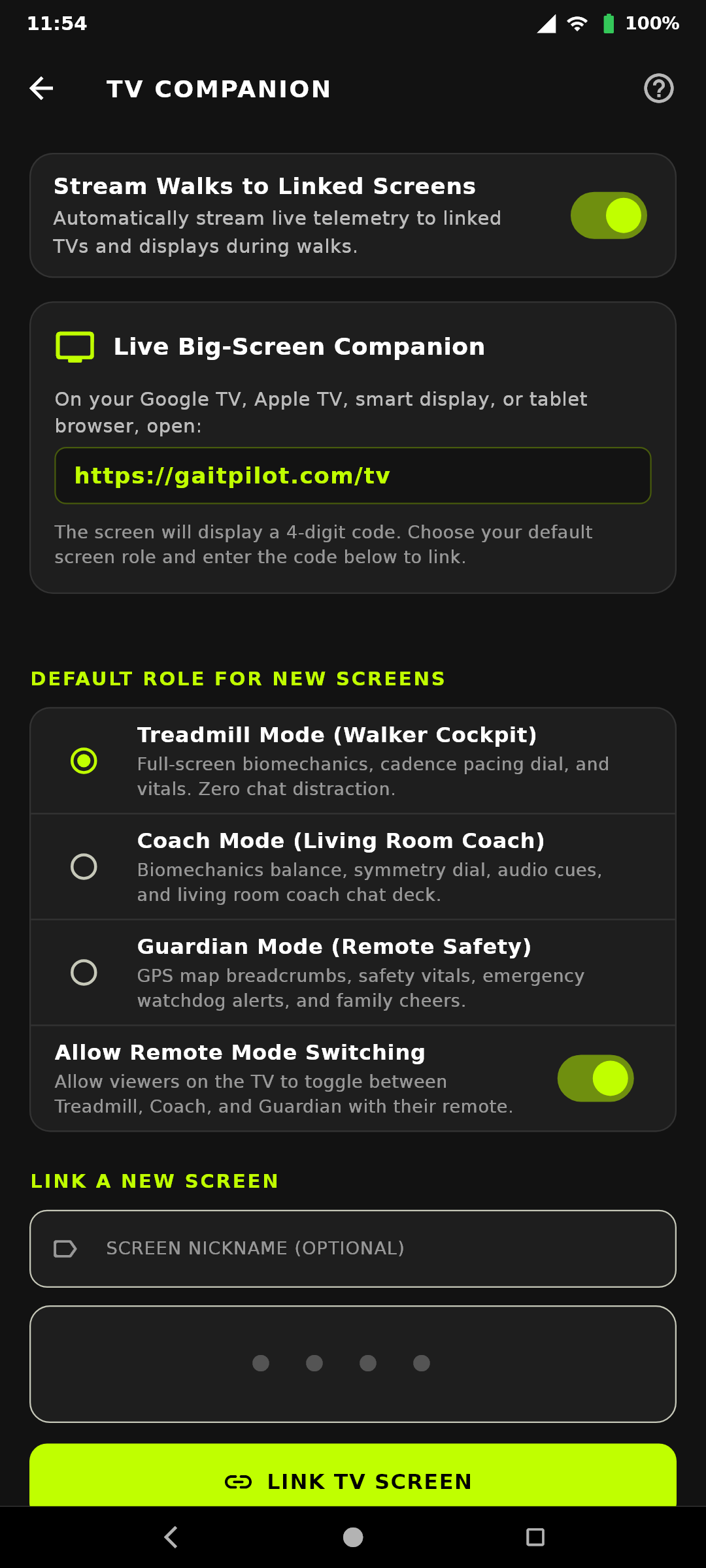
Turn any living room Google TV, Apple TV, Samsung/LG Smart TV, Fire TV, iPad, or smart display into a real-time live command center:
- Zero App Store Installation: Open the web browser on any smart screen or tablet and navigate to
https://gaitpilot.com/tv. - Navigation from Settings or AppBar: Open the TV Companion pairing screen via:
- The
📺TV Companion icon on the top AppBar (visible on Advanced and Pro tiers) - Settings -> CONNECTED COMPANIONS -> TV COMPANION
- Settings -> CONNECTED COMPANIONS -> GUARDIAN SAFETY -> "📺 TV COMPANION"
- Settings -> CONNECTED COMPANIONS -> COACH LIVE SHARE -> "📺 TV COMPANION"
- 4-Digit Fast Pairing: The smart display shows a large glowing 4-digit code. Type the 4 digits in
TvPairingScreenand give the display an optional nickname ("Living Room Sony 65", "Kitchen Nest Hub"). - Screen Role Assignment:
- Flexible [Default]: Displays interactive
CoachandGuardiantoggle buttons on screen. - Dedicated Guardian Safety: Locks display strictly to Guardian mode (live map, vitals, watchdogs, family cheers).
- Dedicated Coach Command: Locks display strictly to Coach mode (biomechanics dials, cadence pacer, tactical drill cues).
- Automatic Session Sync & Cloud Freedom: The moment you tap "Start Walk" on your phone, the TV automatically wakes from ambient standby to display your 16:9 live command center. The TV streams directly over home Wi-Fi via WebSockets from Cloud Run—lock your phone and head out the front door!
Quick Setup for Google Nest Hub Max & Google TV (Sighted Assistant & Voice Commands)
- On Google Nest Hub Max: Say aloud: "Hey Google, open gaitpilot.com/tv". Ask a sighted helper: "Please read the four glowing numbers in the center of the screen." Enter the 4 digits on your phone in Settings -> Link TV. Future walks wake up automatically!
- On Google TV: Hold remote mic button and say: "Open browser to gaitpilot.com/tv". Enter the 4 digits on your phone. Have your helper select "Pin to TV Home Screen" to keep GaitPilot right next to Netflix.
4.6 Future Offline Sensor Roadmap (WT901 SD-CL)
- Sanctioned Competition & Wilderness Trails: In sanctioned World Athletics Rule 54.2 race walking events, wireless electronic transmission is prohibited.
- Dual-Mode MicroSD Logging: Athletes will be able to arm dual-mode WT901 SD-CL sensors over Bluetooth before an event. Tapping Start commands the sensors to begin high-speed offline flash logging (up to 200 Hz) and powers down Bluetooth radios for zero-RF compliance.
- Direct-on-Phone Ingestion: Post-race, connecting sensors to the phone via USB-C OTG will ingest raw flash data and execute kinematic analysis through the embedded Rust DSP core in under 3 seconds—synchronizing trajectories with phone GPS without needing a laptop or cloud server.
Part 5: Guardian Safety, Configurator & System Reference
5.1 Guardian & Walker Safety Suite
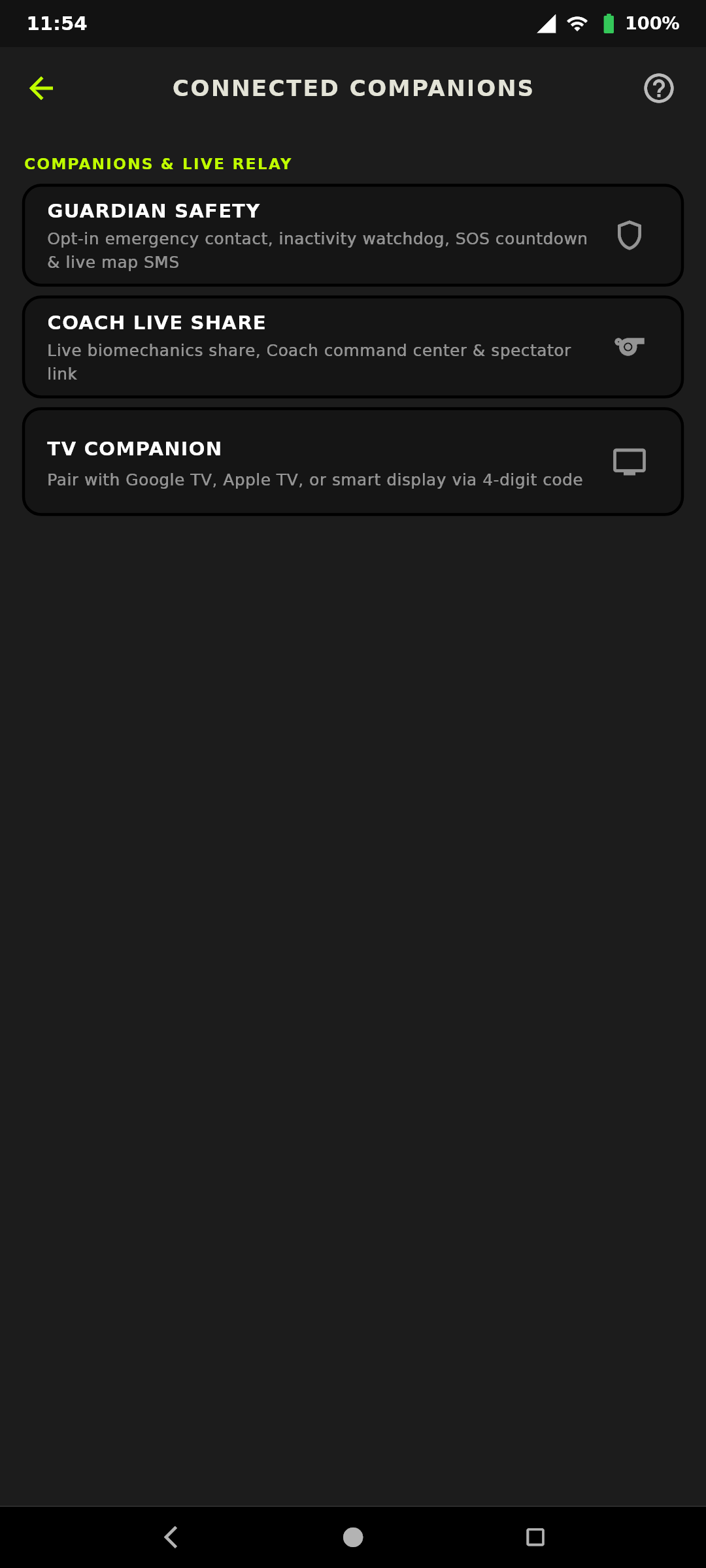
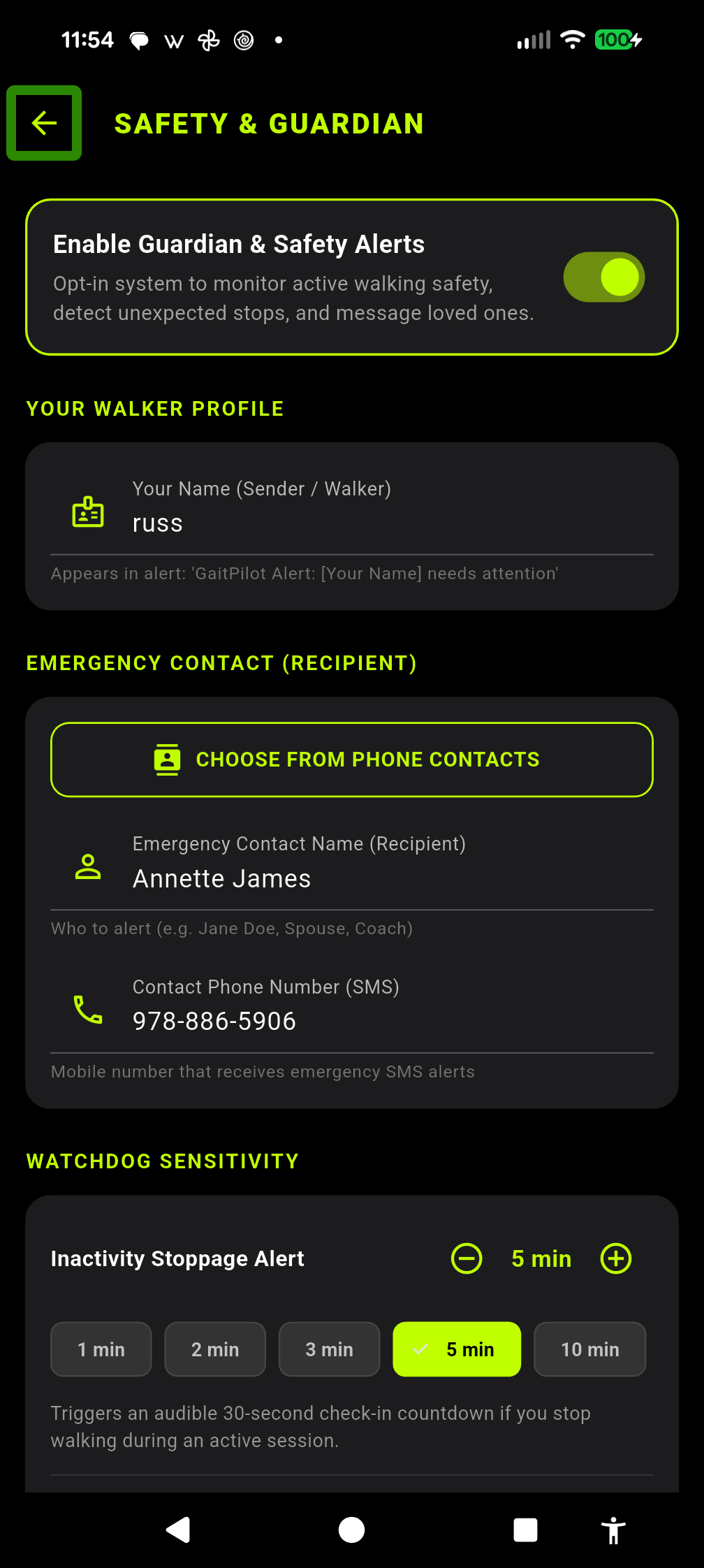
GaitPilot includes a dedicated Walker Safety & Guardian Suite designed for complete peace of mind while walking solo or on remote trails:
1. How to Set Up Guardian Safety (Step-by-Step for Walkers)
- Open Guardian Safety: From the top app bar on the main dashboard, tap the Guardian Safety Icon (
🛡️), or navigate to Settings -> CONNECTED COMPANIONS -> GUARDIAN SAFETY. - Enable Walker Safety Suite: Toggle the master switch
ENABLE SAFETY SUITEto ON. (All safety features are strictly opt-in and off by default). - Add Emergency Contact: Enter your trusted contact's Name and Mobile Phone Number (e.g.
(555) 123-4567). - Choose Notification Mode:
- Automatic Live Share SMS (Recommended): Whenever you tap
START SESSION, GaitPilot automatically sends a text message to your guardian with your phone battery level and a private live tracking link (https://gaitpilot.com/live?session=...). - Manual SMS Only: Dispatches text alerts only if an actual fall or inactivity emergency countdown expires.
- Set Inactivity Tolerance: Adjust the inactivity slider (1 to 10 minutes, default 2 minutes) based on whether you frequently pause to chat or take photos.
2. How It Works While You Walk
- Personal Messaging Only: All emergency notifications are sent directly to your chosen contact via standard text messaging (SMS). GaitPilot never makes automated phone calls or dials 911.
- Hands-Free Two-Way Voice Replies: When your guardian sends a message or cheer from their browser dashboard, your phone gently ducks background audio and speaks: "Guardian says: [message]. Say your reply now." An automatic 5-second listening window captures your spoken answer and routes it directly back to their screen.
- Pausing vs. Stopping:
- When you tap
PAUSE(or say "Pause"), your live status updates toWALK PAUSEDand the standard inactivity timer is suspended so you can rest freely. - When you tap
FINISH, live sharing instantly disconnects, microphone listening closes, and the dashboard transitions toSESSION COMPLETED. - Cellular Dead Zone Resilience: If you enter an area without cellular reception, your guardian sees
SIGNAL PAUSEDwith your last confirmed GPS point. When signal returns, your phone automatically uploads backlogged breadcrumbs.
5.2 Biomechanical Fall, Impact & Exertion Watchdogs
GaitPilot combines internal phone accelerometers with optional wearable sensors to provide intelligent, multi-layered watchdog protection:
1. Watchdog Protection Layers
- Deceleration Impact & Fall Watchdog: Detects hard impact spikes ($>2.4\text{G}$ to $5.6\text{G}$ depending on pocket vs. belt mode). If an impact is followed by 5 seconds of total stillness, the safety watchdog arms.
- Prolonged Inactivity Watchdog: If the app detects that you have stopped moving for your configured duration (e.g. 2 minutes) without pausing the workout, the safety pre-alert arms.
- Adaptive Exertion Immobility (Heart Rate Integration):
- When heart rate telemetry is available (via a paired Wear OS watch or Bluetooth heart rate strap), the watchdog gains physiological awareness.
- If you come to a sudden complete stop while experiencing abnormally elevated heart rate ($>165\text{ BPM}$) or unusually low heart rate ($<40\text{ BPM}$), the system recognizes possible acute physical distress.
- Rather than waiting for your standard 2–5 minute inactivity timer, the watchdog accelerates the safety trigger after just 30 seconds of stillness.
- Skin Contact & Off-Wrist Safety: Removing your watch transmits a hardware "Off-Wrist" signal, immediately disarming exertion triggers to prevent false alarms while your watch rests on a nightstand or charger.
2. The 30-Second Pre-Alert Siren & False-Alarm Shield
If any watchdog is triggered, GaitPilot never immediately alerts your emergency contact. Instead, it gives you a guaranteed 30-second window to dismiss false alarms:
1. Loud Pulsing Siren (STREAM_ALARM): The phone sounds a high-visibility pulsing alarm tone every 1.2 seconds through Android's dedicated Alarm channel at full volume, ensuring you can hear it even if media volume is muted.
2. Spoken Voice Countdown: The voice engine announces: "Safety Alert: [Reason]. 30 seconds remaining before Emergency Contact is notified. Tap screen or press volume key to cancel."
3. Eyes-Free 1-Touch Dismissal: You never need to unlock your phone or take it out of your pocket:
- Phone Physical Buttons: Press either physical volume button once (or press your wired earbud inline button).
- Wear OS Smartwatch: Tap the large DISMISS button displayed on your watch screen.
- Voice Engine Confirmation: Announces: "Safety alert cancelled. You are safe." and returns seamlessly to your walk.
4. Emergency SMS Dispatch: If 30 seconds pass without dismissal, the app dispatches an emergency SMS containing your exact GPS coordinates and a one-tap Google Maps navigation link directly to your emergency contact.
5.3 Athletic Coach Live Share & Two-Way Command Center
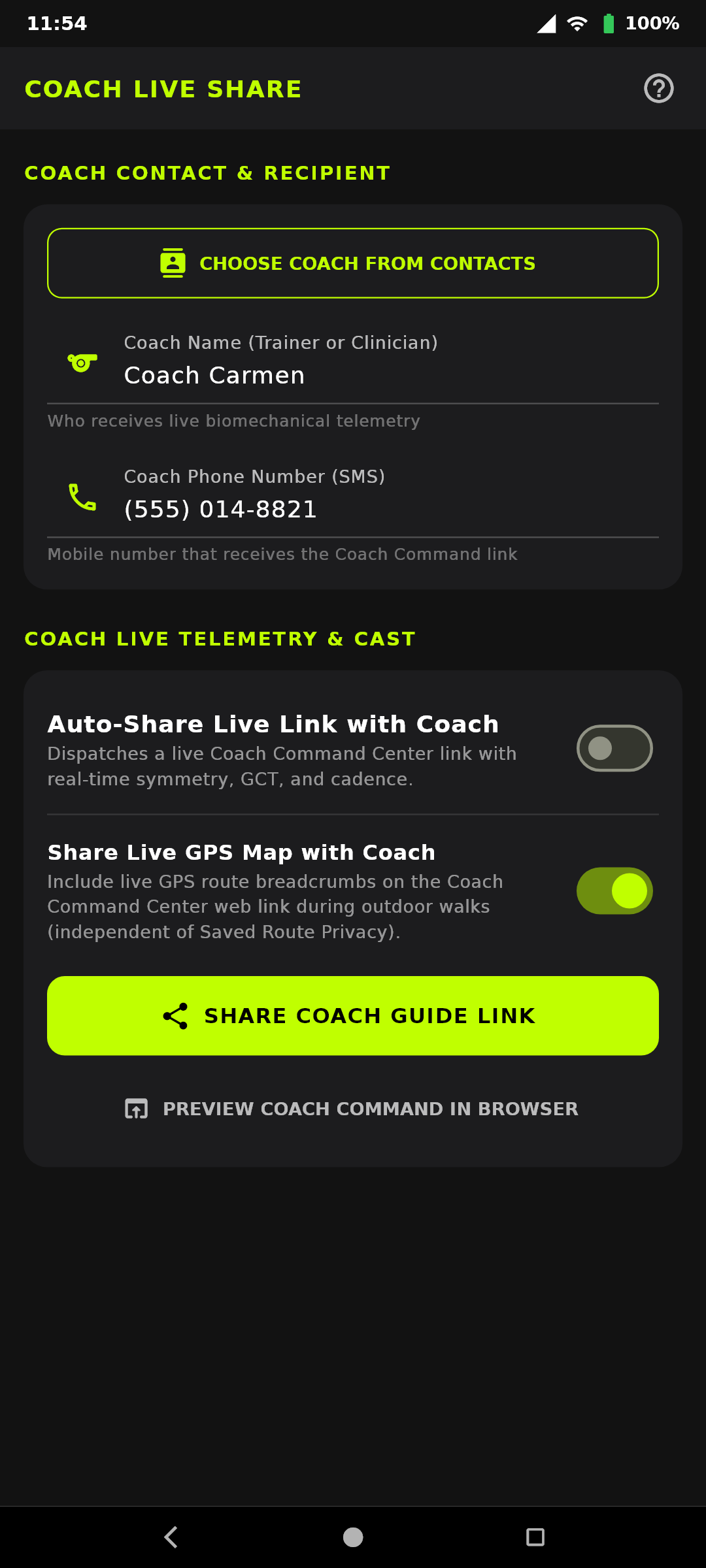
In addition to family Guardian safety, GaitPilot features a dedicated Coach Command Center for athletes working with remote trainers or coaches:
1. Setting Up Coach Live Share
- Navigate to Settings -> CONNECTED COMPANIONS -> COACH LIVE SHARE (or tap the Coach Live Share Icon (
📡) on the AppBar). - Toggle
ENABLE COACH LIVE BROADCASTto ON. - Enter your coach's first name and mobile phone number (phone numbers stay strictly on your phone to open your SMS app; only first names are shared).
- Toggle
Share Live GPS Map with CoachON or OFF to control whether your coach sees your real-time GPS route map on their live dashboard (independent of your saved route privacy mode). - When you start your session, your coach receives an SMS invitation with a private link to
https://gaitpilot.com/live?session=...role-locked specifically to the Coach Command Center.
2. Strict Privacy & Channel Partitioning
- Dual-Channel Isolation: Coach communications and Guardian safety communications operate on completely separate, isolated frequency channels.
- No Cross-Contamination: Tactical drill cues from your coach never appear on your family's Guardian dashboard, and family check-ins never interrupt your coach's real-time biomechanics view.
- Remote Coach Drill Ingestion: Your coach can send specific cadences, pacing intervals, or verbal form corrections from their web dashboard that play directly into your headphones during the workout.
5.4 Universal TV & Smart Display Mirroring (In-Home Workouts)
When walking or running indoors on a treadmill or outdoors, you can project your live metrics onto any living room Google TV, Apple TV, smart display, or tablet without installing any apps:
- Open Web Browser on TV: Navigate to
https://gaitpilot.com/tv. - Pair with 4-Digit Code: On your phone, go to Settings -> CONNECTED COMPANIONS -> TV COMPANION (or tap the TV Companion icon on the top AppBar or inside Guardian Safety / Coach Live Share settings) and enter the 4 digits displayed on your TV screen.
- Per-TV Display & Privacy Controls: Each linked TV card in your Linked Screens list includes three independent controls that update the television in real time:
- Default Display Mode: Choose Flexible, Treadmill Cockpit, Coach Command, or Guardian Safety.
- Allow Remote Mode Switching: Toggle ON to let viewers in the room switch modes using their TV remote, or toggle OFF to lock the TV strictly to its assigned role.
- Show Live GPS Map on This TV: Toggle ON to display the live GPS map on that specific screen, or toggle OFF to collapse the map and expand the telemetry and biomechanics cards.
- Automatic Wake on Walk Start: Once paired, simply tap
START SESSIONon your phone; the TV automatically wakes from ambient standby to display your live 16:9 dashboard over your home Wi-Fi.
5.5 Settings, Dashboard & Voice Metrics, Route Privacy & Backup
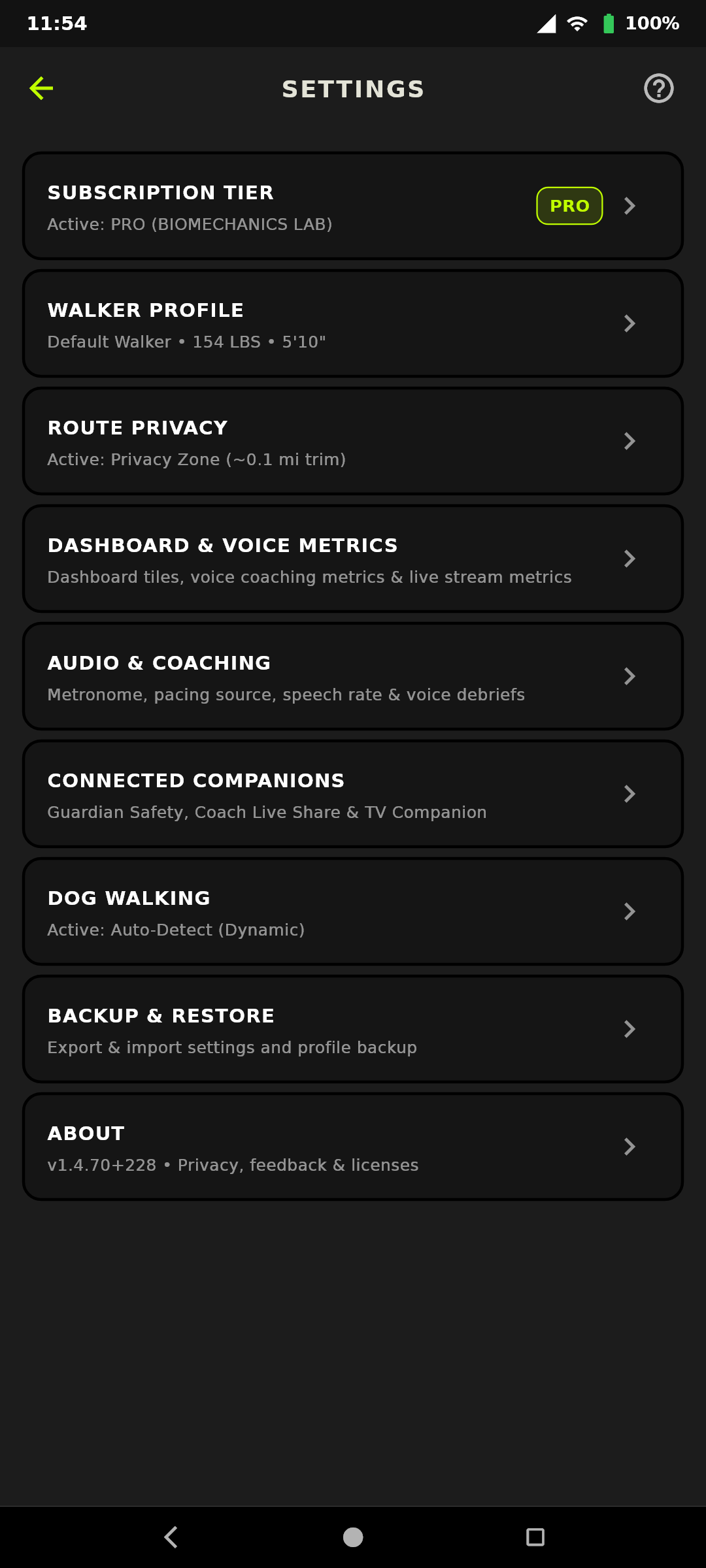
Tapping the ⚙️ Settings gear icon on the top AppBar opens the 9-card Settings hub. Every card label matches the exact title of the screen it opens, and every sub-screen includes a top-right [?] Help button:
SUBSCRIPTION TIER: View or switch your active membership tier (Free,Sonify,Advanced, orPro / Elite).WALKER PROFILE: Configure your first name, body weight, height, and profile-specific stride lengths.ROUTE PRIVACY: Placed near the top of Settings for privacy-first access. Controls how your GPS route coordinates are saved to post-walk reports and the Cloud Analysis Dashboard.DASHBOARD & VOICE METRICS: Configure quick dashboard presets and per-metricDASH,VOICE, andLIVEchannel visibility.AUDIO & COACHING: Configure Coaching Persona, Pacing & Metronome Source (Sacrum,Lower Body,Left/Right Foot,Upper Body,Left/Right Wrist, orPhone (Internal Pedometer)), Target Cadence, Metronome Pulses, Posture Drone, Voice Announcements, and Form Alert Toggles.CONNECTED COMPANIONS: Unified hub forGUARDIAN SAFETY,COACH LIVE SHARE, andTV COMPANION.DOG WALKING: Configure dog profiles, dynamic leash hand detection, and spinal balance reminders.BACKUP & RESTORE: Export or import your complete app configuration, Shoe Vault, and session history.ABOUT: DisplaysAPPLICATION VERSION(tap to copy version and build number to the clipboard),PRIVACY POLICY,HEALTH & SAFETY DISCLAIMER,SEND FEEDBACK, andOPEN SOURCE LICENSES.
1. Quick Dashboard Presets (Settings -> DASHBOARD & VOICE METRICS)
- Clean Core (Default): Streamlined essentials (Speed, Cadence, Symmetry, GCT, Heart Rate).
- Joint Rehab: Emphasizes stance times, pronation angles, limp detection, and impact shock ($G$).
- Athletic / Race Walk: Highlights Olympic flight phase warnings, knee extension, push-off velocity, and high-cadence pacing.
- Full Pro (All): Displays all 32 telemetry channels including bilateral GCT, Impact Force ($G$), Push-Off Velocity, and Stance Sub-Phases.
2. Tri-State Channel Controls (Settings -> DASHBOARD & VOICE METRICS)
Each metric features three independent, accessible action buttons:
* DASH (Visibility): Renders the metric card as a live tile on your main phone dashboard.
* VOICE (Spoken Reports): Controls whether this metric is announced during timed progress reports or voice queries ("What's my status?").
* LIVE (Broadcast / Privacy Sharing): Determines whether this metric is broadcast in real time to your Guardian Live Map and Coach Command Center. You can share Speed while keeping advanced biomechanical angles completely private.
3. Saved Route & Analysis GPS Privacy Selector (Settings -> ROUTE PRIVACY)
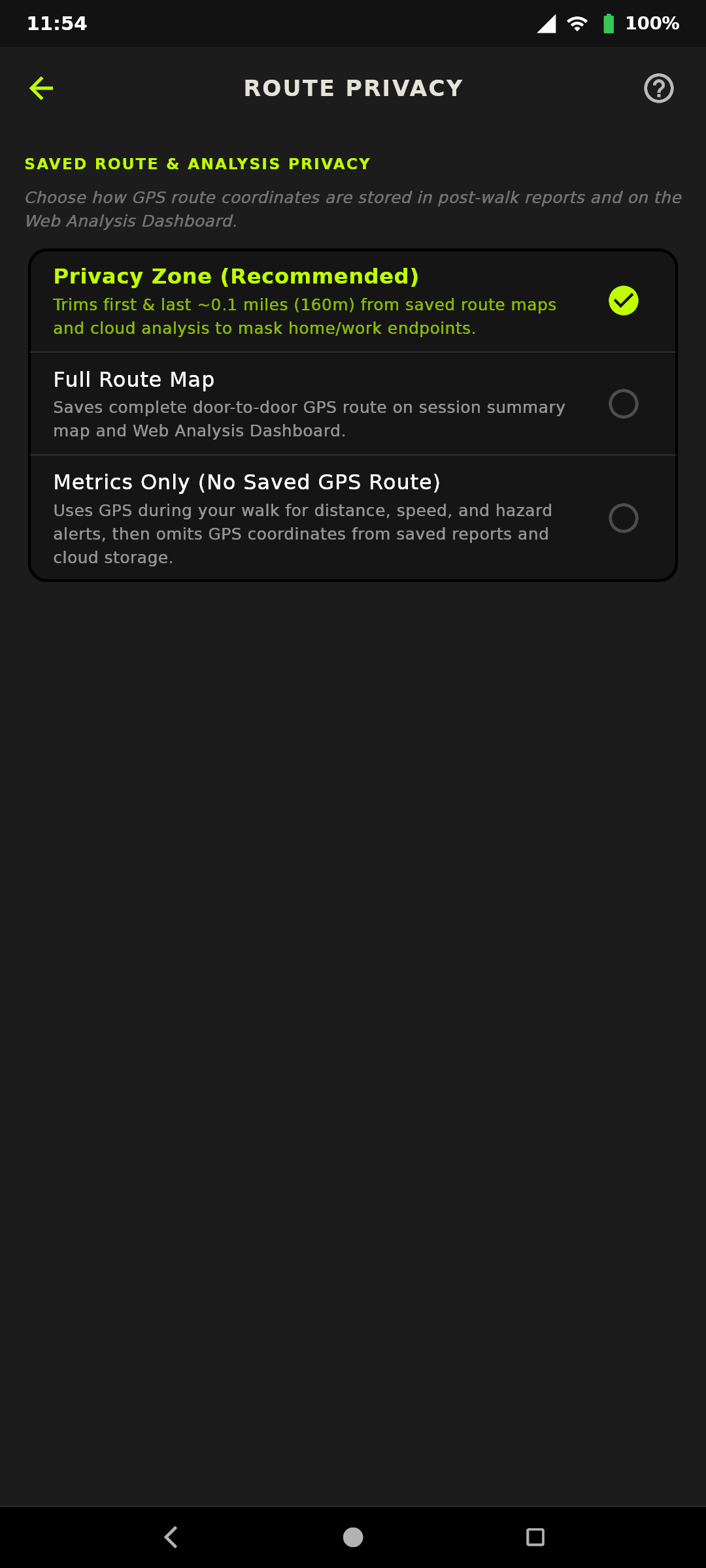
In Settings -> ROUTE PRIVACY, choose how your GPS route coordinates are saved to post-walk reports, Tab 4 of the Session Summary, and the Cloud Analysis Dashboard:
* Privacy Zone (~200m Start/End Trim) [Recommended Default]: Automatically trims the first and last ~200 meters of your walk route and redacts event coordinates inside your home/start/end buffer while preserving your middle route.
* Full GPS Route: Saves your complete door-to-door GPS route and event coordinates.
* Metrics-Only (No GPS): Never saves GPS coordinates to your session reports, .bin sensor files, or the Cloud Analysis Dashboard, while still using GPS in real time during your walk to calculate distance, speed, elevation, and local Spatial Hazard Radar audio warnings. On Tab 4 of the Session Summary, the map is hidden while your Recorded Route Hazards list and its Save/Delete switches remain 100% functional so you can manage local hazards without exposing coordinates.
* Independent Live GPS Map Toggles: Even if you select Metrics-Only (No GPS) for saved reports, you can independently enable or disable Share Live GPS Map with Guardian (in Guardian Safety), Share Live GPS Map with Coach (in Coach Live Share), and Show Live GPS Map on This TV (on each linked TV card in TV Companion). Note: If an un-cancelled 30-second Fall, Inactivity, or SOS emergency countdown expires, your emergency coordinates are always dispatched to your Guardian so they can find you.
5.6 Telemetry Validity & Sentinel States
GaitPilot clearly distinguishes between valid zero-readings and invalid or disconnected metrics:
* 0 (Active Zero / Connected & Stationary): Sensor is connected and actively streaming, but you are standing still. Your screen reader (such as Google TalkBack) explicitly announces "0 steps per minute, standing still".
* *** (Invalid / No Data / Disconnected): Sensor is disconnected, has not sent samples, or has stalled. Your screen reader announces "No data".
* --- (Under Range / Low): Metric is below operational detection threshold.
* +++ (Over Range / High): Metric exceeds physiological ceiling.
5.7 System Warning & Error Conditions Reference
1. Sensor Readiness & Warnings
- "Notice: External sensors uncalibrated" (Yellow Banner): Connected WT901 sensors have not completed baseline tare. Stand still on level ground, double-tap volume button, and say "calibrate" (or tap Tare/Calibrate in Sensor Hub).
- "Notice: [Placement] sensor battery low" (Yellow Banner): External sensor battery is below 30%.
- "Notice: Phone Sacrum uncalibrated" (Yellow Banner): Phone in Sacrum Belt mode has no baseline gravity orientation. Stand tall and tap Calibrate Sacrum.
2. Device & Hardware Errors
- "Notice: [Placement] sensor config error / no data" (Red Banner): Sensor is paired but not streaming frames. Turn physical sensor power switch off, wait 3 seconds, and turn back on.
- Stalled Sensor Alert (Grey Sensor Icon): Sensor stopped sending data for >1.5 seconds mid-session. Ensure sensor did not power off or go out of Bluetooth range.
3. Cloud Sync & Network Errors
- "Cloud Upload Timeout / Server Connection Failed" (SnackBar Toast): Cellular timeout. Both your session report (
.session.json) and 100Hz sensor stream chunks (.bin) remain safely queued in your phone's local/pending_uploads/outbox and upload automatically the next time Wi-Fi connects. - "Upload over Cellular Data?" (Modal Prompt): Finishing on mobile data. Tap Yes to upload immediately (~1–5 MB), or No to hold both your session report and 100Hz sensor stream in the local outbox until Wi-Fi connects.
5.8 Edge-First Architecture, Cloud Sync & Data Privacy
- 100% Offline Local Sandbox & Outbox Queue: All telemetry, session summaries, and Shoe Vault records are saved immediately to device SQLite storage and the local
/pending_uploads/outbox (.session.json+.binsensor streams). If you finish a walk offline or decline cellular upload, the app automatically uploads your queued session report and 100Hz sensor streams the next time your phone connects to Wi-Fi. - Strict PII Minimization (First-Name-Only & Masked Hardware IDs):
- First Names Only: Walker, Guardian, and Coach names are automatically trimmed to first names only in session reports, cloud storage, and live-share packets.
- Zero Cloud Phone Numbers: Guardian and Coach phone numbers never leave your phone; they are used strictly on-device to populate your Android SMS app.
- Masked Sensor MAC Addresses: External WT901 Bluetooth MAC addresses are masked to their last 4 characters (
WT901-XXXX) in all reports and cloud uploads. - Anonymous Client-Side Identifier (
walker_id): Your device generates a random RFC 4122 UUID v4 stored in deviceSharedPreferences. All cloud telemetry uploads and live sessions are tagged strictly with this anonymous identifier. - Private Web Analysis Dashboard Discovery: Tap the Analytics Icon (
Open Web Analysis Dashboard) in the top bar of Past Sessions to opengaitpilot.com/dashboard/?walker_id=<UUID>scoped exclusively to your walks. The public dashboard never displays other walkers' sessions or reveals user identities. - Radio Shielding During Walks: Background cloud uploads are strictly suppressed during active walks to protect 100 Hz Bluetooth sensor streams from radio contention.
- In-App Profile JSON Export & Import: In Settings -> PROFILE & DATA MANAGEMENT, export a complete
gaitpilot_profile.jsonbackup containing all shoe vault gear, mileage, custom pacing, and emergency contacts. Restore on any Android device via native file picker. - Android Google Drive Backup: User preferences and local session databases are included in Google One encrypted device backups.