GaitPilot Universal TV Companion Guide (gaitpilot.com/tv)
Welcome to the GaitPilot Universal TV Companion Guide. GaitPilot TV transforms any television, smart display, trackside monitor, or clinic tablet into an ambient 16:9 widescreen biomechanical dashboard with zero app installation.
Navigate to the television display hub in any browser: https://gaitpilot.com/tv
🔒 Athlete-Initiated Privacy & Session Control
A foundational security principle across GaitPilot is that only the walker can start a session and broadcast telemetry.
- No Remote Waking: A coach, follower, or Guardian cannot wake up an athlete's sensors, trigger tracking, or view movement without the walker actively pressing START on their mobile phone.
- Explicit Screen Pairing: A TV screen cannot connect to an athlete's workout unless the athlete physically enters the screen's temporary 4-digit code into their mobile phone under Settings → Link TV / Smart Display.
- Instant Disconnect: The athlete maintains an active Linked Displays inventory inside the mobile app. With a single tap, the walker can unlink any display at any moment.
- Automatic Session Closure: When the walker taps STOP on their mobile phone, the live WebSocket feed terminates immediately, and connected TV screens return to standby.
🔄 Dedicated Display Binding & "Last Linked Wins" Protocol
To keep big-screen viewing intuitive and prevent confusing split-screen clutter or data cross-talk, GaitPilot enforces a dedicated single-session display binding model:
- Ephemeral Single-Use Codes: Each 4-digit numeric code is cryptographically unique, valid for 10 minutes, and permanently consumed and erased from the server the moment a phone pairs with it. A code cannot be intercepted or reused by a second device.
- Dedicated 16:9 Display Focus: A physical television or trackside smart display renders exactly one athlete's active workout at a time, ensuring that coaches and observers have an unambiguous, distraction-free view of that walker's live symmetry and vitals.
- Last Linked Wins Resolution: If another athlete or coach subsequently pairs the same television screen by entering a freshly generated 4-digit code, the server automatically re-binds the television display to the newly linked athlete and cleanly unbinds the previous session. The previously linked phone receives an unlinked status notification in its display inventory, guaranteeing that workouts never overlap or bleed into each other.
- Complete Session Purge (
resetSessionState()): Every time a new workout session starts, the TV interface immediately executes a comprehensive memory and canvas purge: completely wiping the GPS breadcrumb trail, resetting speed to 0.0, zeroing out step and cadence counters, and clearing chat feeds. This guarantees zero ghost data or residual metrics from previous walks appear on screen.
📺 Big-Screen Hardware Compatibility
GaitPilot TV runs natively inside any modern HTML5 web browser. No app store downloads or APK installations are required:
- Living Room Televisions: Google TV, Android TV, Samsung Tizen Smart TVs, LG webOS TVs, Amazon Fire TV (Silk Browser), and Apple TV (via AirPlay or browser).
- Trackside & Gym Displays: Widescreen PC monitors, smart mirrors, and wall-mounted tablets.
- Clinical & Laboratory Monitors: Secondary HDMI or wireless displays hooked to coaching workstations.
🚀 Easy 4-Digit Pairing Walkthrough
Setting up a big-screen companion takes only seconds:
- Launch Browser on Your Display: Open the web browser on your TV and go to
https://gaitpilot.com/tv. - Read the Ephemeral Code: The screen presents a high-contrast standby screen with a unique, glowing 4-digit numeric code (e.g.,
4821). - Link in the Mobile App: In the GaitPilot phone app, open Settings → Link TV / Smart Display, enter the 4 digits, and optionally assign a nickname (such as "Living Room Sony 65" or "Clinic Trackside Display").
- Automatic Activation: As soon as the walker starts an active session on the phone, the linked TV wakes up automatically, transitioning from the standby card to the live 16:9 telemetry command deck.
📊 16:9 Ambient Screen Modes & Per-TV Controls
The TV Companion operates as part of GaitPilot's unified Progressive Web App (PWA) architecture. When linking any TV or display in the mobile app under Settings → Link TV / Smart Display, walkers can configure three independent controls on each linked TV card (Default Display Mode, Allow Remote Mode Switching, and Show Live GPS Map on This TV) that update the television in real time:
* Guaranteed Core Trip Badge (Always Visible): A dedicated, high-contrast header badge displays Total Distance and Elapsed Duration (e.g. 2.45 mi • 41:20), hardcoded into every broadcast packet so observers always know cumulative walk progress.
* Three Dedicated Dashboard Modes:
1. Dedicated Treadmill Cockpit: High-contrast speed, cadence metronome, incline, and elevation gain display with outdoor maps collapsed. Ideal for in-home gym TV screens facing treadmills.
2. Dedicated Coach Command: Biomechanical symmetry dials, Ground Contact Time (GCT) balance, impact deceleration, and drill cues with the mode switcher hidden.
3. Dedicated Guardian Safety: Street-level GPS map, phone battery telemetry, and audible watchdog alerts with the mode switcher hidden.
* Flexible / Either (Allow Switching on Screen): Enables interactive role toggle buttons (Treadmill, Coach, Guardian), allowing viewers in the room to switch perspectives with their TV remote (D-pad Center / Enter / Spacebar).
* Setting-Driven Mode Retention: The assigned TV mode remains active regardless of indoor/outdoor status. When transitioning between indoor and outdoor walking, the screen seamlessly removes or restores the map canvas while staying locked in your assigned dashboard view.
1. Dedicated Treadmill Cockpit
Designed specifically for in-home treadmill runners and indoor walkers looking at a living room TV or gym monitor: * Large-Scale Pacing & Cadence: Oversized, glanceable displays for current speed (MPH) and steps-per-minute (SPM). * Incline & Elevation Gain: Real-time grade and accumulated vertical climb. * Zero-Map Layout: Collapses the outdoor GPS map to expand biomechanics balance, symmetry dials, and live chat.
2. Coach Biomechanics Deck (?role=coach)
Designed for coaches, athletic trainers, and physical therapists who need granular movement diagnostics during workouts: * Real-Time Gait Symmetry Dial: A prominent center radial gauge indicating bilateral symmetry percentage. * Cadence Metronome & Pacer: Current steps-per-minute alongside the target cadence delta. * Bilateral Ground Contact Time (GCT): Left vs. Right foot contact duration in milliseconds. * Impact Braking Force: Peak vertical deceleration in G-forces for both feet. * Interactive Terrain Map: Dark-mode course trail with speed and elevation profiles.
3. Guardian Safety View (?role=guardian)
Designed for family members and caregivers who want ambient reassurance while an athlete or elder is out walking:
* High-Visibility GPS Map: Smoothly tracked street-level beacon following the walker's path.
* Vitals & Battery Telemetry: Large, high-contrast indicators for phone battery percentage, walking pace, and heart rate.
* Audible Safety Watchdog Alerts & One-Tap Silence: If an antalgic collapse or fall is detected by the phone's safety engine, the TV displays a flashing red emergency alert banner and synthesizes an audible room chime. Viewers can tap the accessible [🔇 SILENCE ALARM] button with their TV remote to mute the chime while preserving emergency coordinates and navigation.
🌐 Independent Global Cloud Streaming
The TV companion connects directly to the GaitPilot cloud relay over low-latency WebSockets (WSS).
Once paired, the phone and the television do not need to be on the same Wi-Fi network. An athlete can start walking outdoors miles away on cellular LTE/5G, while a coach or guardian in another room—or another country—monitors live biomechanics in real time with sub-second latency.
📶 TV Connection Resilience, Pauses & Emergency Silence
Big-screen TV companions are designed to run autonomously without requiring maintenance or remote button-pressing during network interruptions:
1. Walker Pauses the Walk (WALK PAUSED)
- What appears on TV: If the athlete pauses their workout (e.g. resting, drinking water, or stretching), the TV status dot changes to cyan/sky blue with
WALK PAUSED. - Active Display: The map, breadcrumb route, heart rate, and two-way living room chat remain fully visible and active.
- Watchdogs: Inactivity alarms are suspended while paused to prevent false sirens while the walker sits on a bench.
2. Reactive Indoor / Treadmill Mode (Map Collapsing & Biomechanics Expansion)
- Automatic Indoor Detection: When the athlete activates Indoor Mode (or treadmill profile) on the mobile phone, the TV dashboard reactively adapts in real time:
- Map Hidden: The outdoor map canvas is collapsed and hidden (
display: none !important), and existing breadcrumb paths and GPS location pins are wiped. - Header Badge: An electric lime
INDOOR / TREADMILLbadge appears in the TV top bar. - Expanded Layout: Biomechanical symmetry dials, Ground Contact Time balance, and live coach/companion chat expand into a side-by-side full-height console optimized for treadmill athletes and trackside coaches.
- Outdoor Return: Toggling back to Outdoor Mode on the phone instantly re-mounts the map and recalculates container dimensions (
map.invalidateSize()) for smooth outdoor route tracking.
3. Cellular Dead Zones & Wi-Fi Drops (SIGNAL PAUSED)
- Walker in Dead Zone: If the walker passes through a tunnel or dead zone, the TV status badge switches after 15 seconds to amber
SIGNAL PAUSED (X ago). The map freezes on their last-known coordinates. - Automatic Reconnect: The second the walker's phone regains cellular data, the TV updates back to green
LIVEwithin 2 seconds with zero viewer interaction. - TV Home Wi-Fi Blips: If your television's Wi-Fi drops momentarily, the TV app automatically retries in the background and re-attaches to the live stream the instant your home internet returns. You never need to enter the 4-digit code again.
4. Session Termination, Finish from Pause & Ambient Standby
- Immediate Disconnect on Finish or Discard: When the walker taps FINISH or DISCARD on their mobile phone—including when a session is paused—the mobile app stops broadcasting immediately and dispatches a session-end signal to the cloud relay.
- Live Feed Closed: The TV instantly terminates the live telemetry view (
walk_ended), stops audio sirens, and takes down active metrics. - 3-Minute Summary Transition: The TV displays a full-screen summary card (distance, duration, cadence, steps, and symmetry) for 3 minutes before smoothly returning to ambient clock standby (
Ready for Alex's Next Walk). - Phone Summary Review Isolation: Because the TV companion transitions to the 3-minute summary screen the moment FINISH or DISCARD is tapped on the phone, the walker can leave the mobile app's summary scorecard open on their phone for hours without keeping the TV live stream open or showing stagnant data.
- Zero Ghost Maps on Next Walk: Whenever a new session is started,
resetSessionState()runs automatically, wiping all prior map polylines and coordinates so residual trails from previous sessions never appear. - Dead Battery / Crash Timeout (20 Minutes): If a phone battery dies or crashes mid-workout, the TV holds the last valid coordinates for 20 minutes before gracefully returning to standby.
5. Silencing Emergency Siren on Big Screens
- Full-Screen Red Takeover: If an impact fall or distress trigger dispatches an alert, the TV screen displays a high-visibility red emergency banner and sounds an audible room siren.
- Remote Silence Button: The banner includes an accessible
[🔇 SILENCE ALARM]button. Navigating with your TV remote's D-pad and pressing OK/Enter immediately silences the television speakers while keeping the directions button and alert details clearly visible on screen.
🎛️ Master Streaming Toggle: "Stream Walks to Linked Screens"
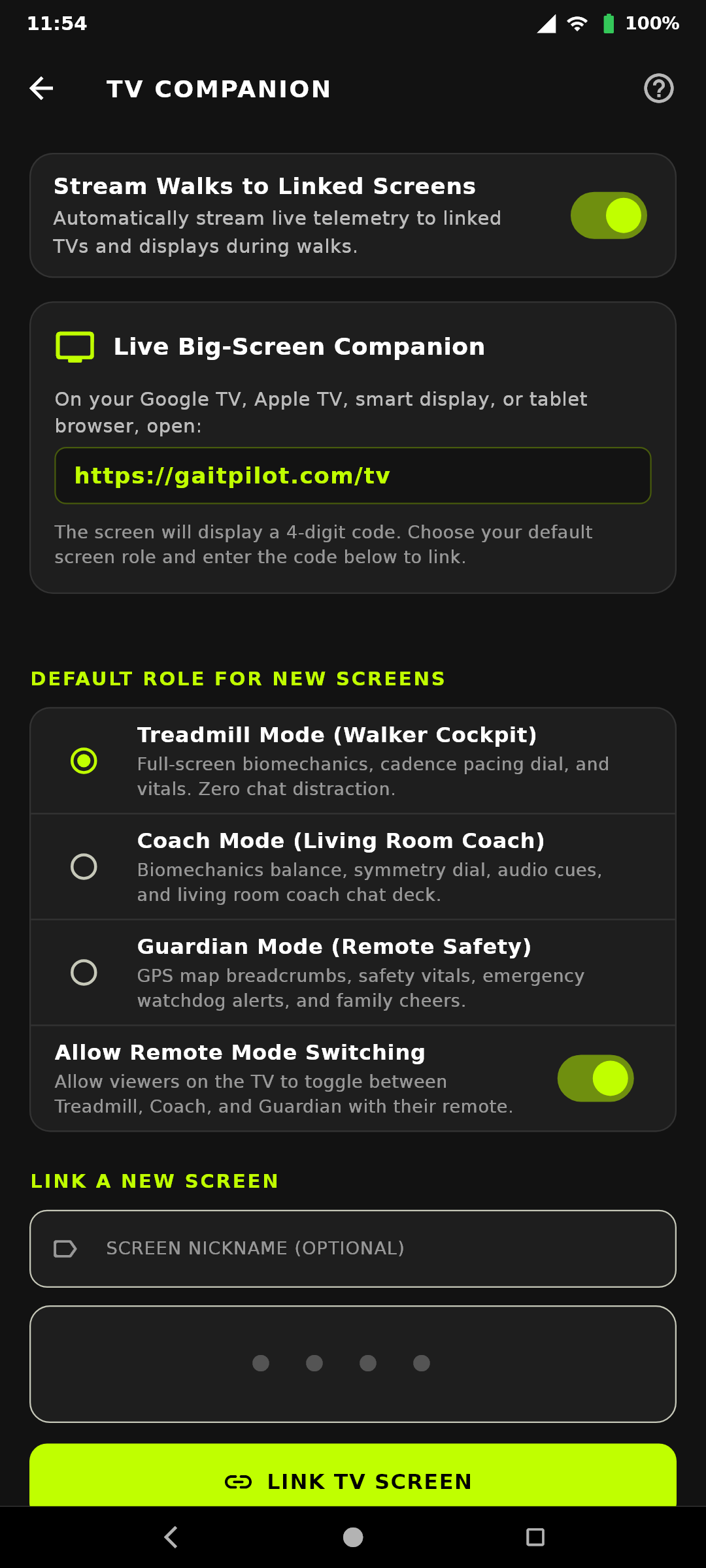
In the GaitPilot mobile app under Settings → Connected Companions → TV Companion (or via the TV Companion icon on the top AppBar): * One-Tap Transmission Control: The top of the screen features a master switch: "Stream Walks to Linked Screens". * Instant Privacy: When toggled OFF, live telemetry transmission to TV screens is immediately withheld, conserving phone battery and mobile data without deleting your paired screen configurations. * Persistent Screen Preservation: The phone's local storage retains all paired displays. Even when cloud backend instances scale down or restart, your linked screens remain saved on the phone and automatically re-establish connections when a walk starts.
♿ Screen Reader Accessibility & Google TV Remote Microphone Guidance
The TV companion interface is optimized specifically for television screen readers (TalkBack on Google TV / Android TV, VoiceOver on Apple TV/iPad, and NVDA / JAWS on PC):
* Interactive-First D-Pad Traversal: The interactive Living Room Chat & Quick Cheer deck is structured first in the DOM/focus order. Upon switching to the live walk view, screen reader users land directly on the chat and quick cues ("Target Cadence!", "Stand Tall!", "Looking Great!") rather than having to click through 30+ passive metric boxes.
* Unified Card Aggregation (No "Bit-by-Bit" Fragmentation):
* Rather than announcing each individual number, unit, and label separately ("0.0", "MPH", "Speed"), metric cards are consolidated into single unified stops (#card-vitals, #card-biomechanics).
* TalkBack reads out the full composite telemetry in one smooth, human-friendly utterance (e.g., "Walking Vitals: Speed 3.2 miles per hour, Cadence 118 steps per minute, Heart Rate 124 beats per minute, Phone Battery 85 percent" and "Biomechanics Balance: Symmetry 96 percent, Cadence Target on pace. Ground contact time: Left 240 milliseconds, Right 245 milliseconds. Strike impact: Left 1.8 G, Right 1.9 G").
* Internal visual-only markup is cleanly marked aria-hidden="true" to prevent navigation stutter.
* Zero "Article" Clutter: All HTML role="article" attributes have been completely eliminated from the TV interface, eradicating repetitive, meaningless "article" announcements when navigating with a television remote.
* Google TV Remote Microphone vs. On-Screen Dictation:
* System Hardware Constraint: On Google TV remotes, pressing the physical microphone button triggers the television's built-in operating system assistant (Google Assistant / Gemini) rather than the web browser.
* How to Dictate Messages: To speak a coaching cue or cheer from the TV dashboard, navigate using TalkBack or the D-pad arrow keys to the on-screen microphone icon (🎙️) next to the chat box and press OK/Enter to start browser-level voice dictation, or select one of the high-contrast quick cheering chips.
For detailed information on real-time coaching commands and audio cues, consult the Coach Live Guide. For safety alerts, see the Guardian Dashboard Guide. For deep-dive post-walk forensic analysis, visit the Analysis Dashboard Guide.